AskThe ask is the lowest price a seller is currently willing to accept. When you buy with a market order, you pay the ask.Read definition → ten momentum traders for their Trade Ideas scan settings and you'll get ten variations of the same non-answer: "high Relative VolumeRelative volume (RVOL) compares a stock's current trading volume to its average volume for the same time of day, expressed as a multiple — a stock with 5x RVOL is trading five times more actively than normal, signaling unusual interest and Read definition →, strong price action, good FloatFloat is the number of shares of a company that are actually available for public trading — it excludes shares held by insiders, major institutions with lock-ups, and the company itself.Read definition →." That's a description of momentum, not a scan. A scan is a specific stack of alerts and filters with specific values — and the difference between a scanner that prints money-losing noise and one that surfaces two or three genuinely interesting names a session lives entirely in that stack.
This guide gives you five complete momentum scan recipes for Trade Ideas, built from the platform's official documentation — exact alert names, exact filters, starting values, and the reasoning behind every component. It also covers the one piece of platform logic that breaks most beginners' scans before they fire a single useful alert, because no recipe works if you don't understand how Trade Ideas combines its ingredients.
One promise up front: these are well-constructed starting points, not profit machines. A scan finds candidates; whether a candidate becomes a good trade depends on your strategy, your risk management, and conditions no scanner controls. Every recipe here ends with its failure mode, and the final section covers how to test any of them before real money is involved.
What are the best Trade Ideas scans for momentum traders? The five highest-value momentum scans to build first are a Pre-MarketPre-market trading is the session that occurs between 4:00 AM and 9:30 AM Eastern, before the regular market opens — it allows traders to react to overnight news and earnings reports, establishes where stocks will likely open (the gap), andRead definition → GapA gap is a price discontinuity on a chart where a stock opens significantly higher or lower than the previous session's close, leaving a visible empty space — gap-ups are driven by overnight buying pressure or positive news; gap-downs by seRead definition → scan (using volume-pace filters, since relative volume doesn't calculate in the early session), an opening range breakout scan, a high-of-day momentum scan, a low-float runner scan, and a confirmed-surge scan. Each combines one or two event alerts with volume, price, and float filters that suppress noise.
The Logic That Breaks Beginner Scans (Read This First)
Before any recipe, one piece of platform mechanics — straight from Trade Ideas' own documentation — that determines whether your scans work at all.
Trade Ideas combines conditions in two different ways depending on what they are. Alerts combine as OR. An alert is an event — a stock making a new high, breaking an opening range, surging upward. If you check three alert types in one window, the window fires when any one of them happens. Filters combine as AND. A filter is a standing condition — price above $5, relative volume above 2, float below 50 million. A stock must pass every filter you've set.
Put together: a stock appears in your window when it satisfies all of your filters and at least one of your alerts. That single sentence explains the two classic beginner failures. The silent scanner — someone stacks a dozen filters so restrictive that nothing in the market can pass them all — and the firehose — someone checks five alert types with barely any filters, then drowns in hundreds of rows at the open. Every recipe below follows the same architecture for exactly this reason: one or two alerts to define the event, and three to five filters to define the quality bar.
One refinement worth knowing exists: some alerts carry their own alert-specific filters (a New High alert can be qualified to only fire on, say, 5-day highs), separate from the window-specific filters that apply to everything. And if you select no alert at all, Trade Ideas quietly assigns the Heartbeat alert — which is usually the explanation when a "filters-only" scan behaves strangely.
With the logic settled, here are the five scans, in the order the trading day actually uses them.
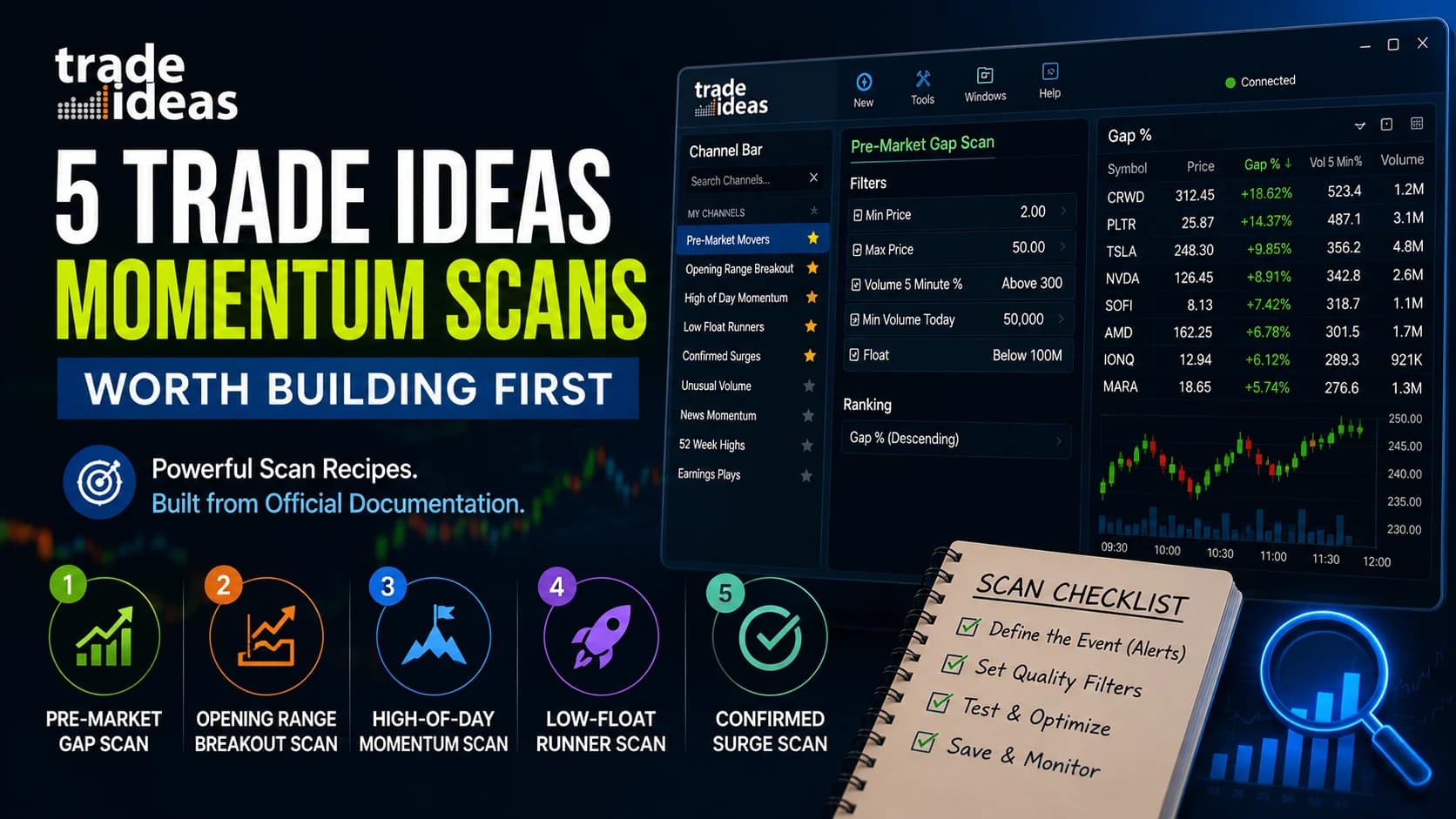
Scan 1: The Pre-Market Gap Scan (Your Morning Watchlist Builder)
What it finds: stocks gapping up on real pre-market activity — the raw material for every gap-and-go, momentum, and opening-drive setup of the day.
The trap this recipe avoids: the obvious volume filter doesn't work here. Trade Ideas' Relative Volume filter compares current volume to the average for the same time of day — and per the platform's own documentation, it doesn't calculate in the early pre-market session. Beginners build a gap scan around RVOL, watch it sit empty at 8 AM, and conclude the scanner is broken. The documented fix is the Volume 5 Minute % filter, which measures volume pace over rolling five-minute intervals and works before the bell.
- Component
- Window type
- Setting (starting point)
- Top List
- Why
- You want a ranked standing list pre-market, not an event stream
- Component
- Ranking
- Setting (starting point)
- Gap % (descending)
- Why
- The gap is the story; rank by its size
- Component
- Min Price
- Setting (starting point)
- $2
- Why
- Below this, spreads and manipulation risk dominate
- Component
- Max Price
- Setting (starting point)
- $50
- Why
- Optional; keeps the list in day-trading territory
- Component
- Volume 5 Minute %
- Setting (starting point)
- Min 200–300
- Why
- 300 = trading at 3x its normal pace right now — proof the gap has actual participation
- Component
- Min Volume Today
- Setting (starting point)
- 50,000+ shares
- Why
- Screens out gaps on a handful of prints
| Component | Setting (starting point) | Why |
|---|---|---|
| Window type | Top List | You want a ranked standing list pre-market, not an event stream |
| Ranking | Gap % (descending) | The gap is the story; rank by its size |
| Min Price | $2 | Below this, spreads and manipulation risk dominate |
| Max Price | $50 | Optional; keeps the list in day-trading territory |
| Volume 5 Minute % | Min 200–300 | 300 = trading at 3x its normal pace right now — proof the gap has actual participation |
| Min Volume Today | 50,000+ shares | Screens out gaps on a handful of prints |
A Top List is the right window type here because pre-market is about building a ranked watchlist, not reacting to events — Trade Ideas' top lists re-rank automatically every 30 seconds, showing the top 100 candidates by default. By 9:15, this list is your morning universe. What you do with it — checking the catalyst, the float, and the chart before the open — is a research discipline of its own, covered in the pre-market gappers evaluation guide.
Where it fails: a gap without a catalyst. This scan measures activity, not reasons — a stock gapping on dilution or a fluff PR looks identical to one gapping on real news until you check. The scan builds the list; it doesn't vet it.
Scan 2: The Opening Range Breakout Scan
What it finds: the first break above the opening candle's high — the classic momentum entry of the first hour.
Trade Ideas' Opening Range Breakout alerts are among the best-documented on the platform, and they contain a detail that makes them stronger than they look: the platform defines the opening range as the first candle of the day, and the breakout alert fires only the first time price crosses above that candle's high. By construction, that means the stock is simultaneously breaking dedicated resistance and making a new daily high — a double confirmation packed into one event. The alerts come in 1, 2, 5, 10, 15, 30, and 60-minute variants; the official documentation notes 15 minutes is the most popular choice, and it's the right default for a first build.
- Component
- Alert
- Setting (starting point)
- Opening Range Breakout (15 minute)
- Why
- The event itself; 15-min is the documented standard
- Component
- Min Price
- Setting (starting point)
- $5
- Why
- ORBs on sub-$5 names behave like a different (wilder) strategy
- Component
- Relative Volume
- Setting (starting point)
- Min 1.5–2
- Why
- RVOL works fine once the session opens; demands genuine interest
- Component
- Volume 5 Minute %
- Setting (starting point)
- Min 150
- Why
- Confirms the breakout candle itself has participation, not just the day
- Component
- Min Volume Today
- Setting (starting point)
- 500,000
- Why
- Liquidity floor for clean fills
| Component | Setting (starting point) | Why |
|---|---|---|
| Alert | Opening Range Breakout (15 minute) | The event itself; 15-min is the documented standard |
| Min Price | $5 | ORBs on sub-$5 names behave like a different (wilder) strategy |
| Relative Volume | Min 1.5–2 | RVOL works fine once the session opens; demands genuine interest |
| Volume 5 Minute % | Min 150 | Confirms the breakout candle itself has participation, not just the day |
| Min Volume Today | 500,000 | Liquidity floor for clean fills |
Two usage notes from the platform's own documentation that most articles miss. First, don't run this scan only as a stock-picker — run the breakout and breakdown variants side by side and watch the ratio. A morning printing thirty breakouts against five breakdowns is telling you something about the whole tape, which is exactly how Trade Ideas suggests using these alerts as a market-strength gauge. Second, match your chart to your alert: a 15-minute ORB alert makes visual sense on a 15-minute chart, not a 1-minute one.
The scan handles detection; the trade around it — sizing the entry, placing the stop relative to the range, handling the failure — is the substance of our first 15 minutes playbook and the broader market open playbook.
Where it fails: low-volatility mornings. When opening candles are tiny, trivial moves "break" them, and the alert's double-confirmation logic loses its meaning. The RVOL filter suppresses most of this, but on a dead tape, fewer alerts is the correct output — resist the urge to loosen filters just to see activity.
Scan 3: The High-of-Day Momentum Scan
What it finds: stocks pushing through their daily high with volume behind the push — momentum continuation in its purest form.
The naked version of this scan is famously unusable. A bare New High alert fires every time any stock ticks above its daily high, which at the open means thousands of alerts washing through your window — noise that buries anything actionable. The entire craft of a HOD scan is in the filters that make "new high" mean "new high that matters."
- Component
- Alert
- Setting (starting point)
- New High
- Why
- The continuation event
- Component
- Time restriction
- Setting (starting point)
- Start ~9:45 AM
- Why
- The first 15 minutes make everything a "new high"; let the open settle
- Component
- Min Price
- Setting (starting point)
- $2
- Why
- Quality floor
- Component
- Relative Volume
- Setting (starting point)
- Min 2
- Why
- The stock must already be having an unusual day
- Component
- Volume 5 Minute %
- Setting (starting point)
- Min 200
- Why
- The push through the high must itself carry volume
- Component
- Min Up from Close
- Setting (starting point)
- 2–3%
- Why
- Demands an established move, not a flat stock drifting to an incremental high
| Component | Setting (starting point) | Why |
|---|---|---|
| Alert | New High | The continuation event |
| Time restriction | Start ~9:45 AM | The first 15 minutes make everything a "new high"; let the open settle |
| Min Price | $2 | Quality floor |
| Relative Volume | Min 2 | The stock must already be having an unusual day |
| Volume 5 Minute % | Min 200 | The push through the high must itself carry volume |
| Min Up from Close | 2–3% | Demands an established move, not a flat stock drifting to an incremental high |
The reasoning stack matters more than the exact numbers: each filter removes a specific noise category. RVOL removes stocks having a normal day; the volume-pace filter removes highs drifted into on thin prints; the up-from-close floor removes technical "highs" on stocks barely off yesterday's close; the time restriction removes the open's blizzard. What's left, most days, is a short list of names the whole momentum community is watching.
Worth adding once you're comfortable: Trade Ideas' New High alert supports alert-specific qualifiers, so the same architecture extends to multi-day highs (a 5-day or 10-day high with the same filter stack is a swing-strength variant). And for a deeper cut on when a stock typically makes its high of day, the platform's time-of-day filters add a genuinely underused edge layer.
Where it fails: chop. In a rangebound tape, stocks poke new highs and immediately retreat, and this scan will hand you every one of those pokes. It's a continuation scan — it presumes a market where continuation happens.
Scan 4: The Low-Float Runner Scan
What it finds: small, thin-float stocks in the early stages of outsized moves — the highest-octane and highest-risk corner of momentum trading.
This recipe has unusual provenance: its core comes from Trade Ideas' own published material on scanning for low-float opening range breakouts, which specifies a $1–$15 price band and relative volume of at least 1.2x as the foundation. The float ceiling is the defining ingredient — with few shares available to trade, genuine demand moves price violently, which is the entire (double-edged) point.
- Component
- Alert
- Setting (starting point)
- Running Up (Confirmed) or ORB (5–15 min)
- Why
- Catch the surge or the range break
- Component
- Min Price / Max Price
- Setting (starting point)
- $1 / $15
- Why
- Trade Ideas' own published band for this setup
- Component
- Relative Volume
- Setting (starting point)
- Min 1.2 (raise to 2+ to tighten)
- Why
- The platform's published floor; low bar by design in this price tier
- Component
- Float
- Setting (starting point)
- Max 20–50 million shares
- Why
- The scarcity that creates the volatility; TI's own AI strategies use sub-20M in places
- Component
- Volume 5 Minute %
- Setting (starting point)
- Min 300
- Why
- Demands the surge is happening now
| Component | Setting (starting point) | Why |
|---|---|---|
| Alert | Running Up (Confirmed) or ORB (5–15 min) | Catch the surge or the range break |
| Min Price / Max Price | $1 / $15 | Trade Ideas' own published band for this setup |
| Relative Volume | Min 1.2 (raise to 2+ to tighten) | The platform's published floor; low bar by design in this price tier |
| Float | Max 20–50 million shares | The scarcity that creates the volatility; TI's own AI strategies use sub-20M in places |
| Volume 5 Minute % | Min 300 | Demands the surge is happening now |
Honesty section, because this scan needs one more than the others. Low-float names are where momentum trading's worst outcomes concentrate: spreads widen without warning, halts are routine, and the same scarcity that fuels the upside guarantees brutal slippage when everyone exits at once. Some of what this scan surfaces will be pump-and-dump activity wearing a momentum costume. Position sizing that assumes a halt can happen at any moment isn't paranoia here — it's the entry fee. The full risk framework is in our penny stock survival guide, and it applies to nearly everything this scan finds.
Where it fails: see above — this scan doesn't fail quietly, it fails expensively. If you're not experienced with halts and thin books, run this one in the simulator for a long time before it touches capital.
Scan 5: The Confirmed Surge Scan
What it finds: sharp momentum bursts anywhere in the day, in any stock, whether or not the move coincides with a daily high.
The high-of-day scan misses a whole category of momentum: the stock that sold off all morning and is now ripping off the lows, or the afternoon mover still below its opening spike. Trade Ideas' Running Up (Confirmed) alert covers that gap — it fires on sharp upward price movement as it happens, and the Confirmed designation means the platform applies additional verification before firing rather than reacting to a single print. The platform's own documentation pairs it with volume filters as the canonical example of alert-plus-filter construction.
- Component
- Alert
- Setting (starting point)
- Running Up (Confirmed)
- Why
- The surge event, wherever it occurs in the day's range
- Component
- Min Price
- Setting (starting point)
- $5
- Why
- Keeps this scan's character distinct from Scan 4
- Component
- Relative Volume
- Setting (starting point)
- Min 1.5
- Why
- Unusual day required
- Component
- Volume 5 Minute %
- Setting (starting point)
- Min 300
- Why
- The surge must be fueled, not drifting
- Component
- Min Volume Today
- Setting (starting point)
- 500,000
- Why
- Liquidity floor
| Component | Setting (starting point) | Why |
|---|---|---|
| Alert | Running Up (Confirmed) | The surge event, wherever it occurs in the day's range |
| Min Price | $5 | Keeps this scan's character distinct from Scan 4 |
| Relative Volume | Min 1.5 | Unusual day required |
| Volume 5 Minute % | Min 300 | The surge must be fueled, not drifting |
| Min Volume Today | 500,000 | Liquidity floor |
This is the scan that earns its keep midday and in the afternoon, when the ORB and HOD scans go quiet. It's also the natural home for a second window running Running Down (Confirmed) with mirrored settings — short-side momentum, and a live read on where the aggression is flowing. The two side by side function like a market thermometer in the same way the breakout/breakdown pair does in Scan 2.
Where it fails: surges without follow-through. A confirmed surge tells you aggression just happened, not that it will continue — midday bursts in particular often exhaust within minutes. This scan finds the spark; your chart read decides whether there's fuel.
Running All Five: The Multi-Strategy Setup
Five scans doesn't mean five windows sprawled across your monitors. Trade Ideas' Multi-Strategy Window combines multiple alert-window strategies into one container, with each strategy color-coded — a single pane where gap plays, ORBs, HOD pushes, and surges stream together, visually distinguished. For a momentum trader, the practical build is: the pre-market Top List standing alone (it's a watchlist, not an event stream), and the four alert-based scans stacked in one Multi-Strategy window.
Two configuration habits from the official documentation make this dramatically more usable. Assign a different sound alert to each strategy — the documented best way to know which scan fired without looking. And link the Multi-Strategy window to a chart window, so one click on any alert loads the chart that tells you whether the alert deserves your next sixty seconds.
Building These: Two Paths (And Why You Should Use Both)
Every recipe above can be built two ways as of 2026.
The fast way: describe it to the AI Assistant. Each table in this guide translates directly into a plain-language request — "build me an alert window for 15-minute opening range breakouts on stocks over $5 with relative volume above 2 and strong 5-minute volume" gets you Scan 2 in seconds, typed or spoken. The Assistant generates a standard window configuration you can then inspect and tune.
The educational way: right-click an alert window, open the configuration, and assemble the stack by hand — alert from the Select Alerts tab, conditions from the Window Specific Filters tab. Slower, and that's the value: after building two of these manually, filter names stop being trivia and start being vocabulary. If the configuration window itself is still unfamiliar territory, the Trade Ideas setup guide covers the workspace basics first.
The recommended workflow is the loop: generate with the Assistant, open the configuration, verify the filters match the recipe, adjust values, and save the window to the cloud so it survives beyond one machine. And note what the recipes deliberately leave open — the values marked "starting point" are exactly that. Your market cap preferences, your risk tolerance, and your session (a scan tuned for the open is mistuned for 1 PM) should all pull the numbers away from the defaults over time.
Before You Trade Any of These: The Validation Step
A well-built scan and a tradeable edge are different things, and conflating them is the most expensive mistake in scanner-driven trading. The five recipes above will reliably surface momentum candidates. Whether any candidate pool is worth trading — with your entries, your stops, your hold times — is an empirical question, and Trade Ideas happens to include the machinery for answering it.
The honest sequence: build the scan, then run it through OddsMaker, the platform's point-and-click backtester, which scores a strategy's rules against recent historical data — win rate, average winner versus loser, drawdown — before a dollar is risked. Survivors graduate to the built-in simulator, which trades on live market data with the identical windows and execution you'd use live. Only after a scan's setups have survived both steps does live capital enter the picture. It's slower than trading Monday's shiny new scan on Monday. It's also the difference between owning a scanner and having a process.
For traders evaluating whether the platform justifies its cost, this article doubles as a preview of what you'd be working with — the low-cost Test Drive is enough time to build all five recipes and judge the output yourself, current pricing and codes live on the deals page, and the full Trade Ideas review covers the whole platform picture. You can explore Trade Ideas here. And if you'd rather have AI-generated momentum signals than build scans at all, that's a different tool on the same platform — Holly — though traders serious about momentum usually end up wanting both the signals and their own scans.
Frequently Asked Questions
Why does my Trade Ideas gap scan show nothing in pre-market?
Relative Volume compares current volume to the historical average for the same time of day, and that comparison isn't available in the early morning session. The Volume 5 Minute % filter measures volume pace over rolling five-minute windows instead, making it the documented pre-market substitute — a minimum of 300 means the stock is trading at three times its normal pace right now.
Key Takeaway: Volume 5 Minute % before the open, Relative Volume after — the single most common fix for a "broken" pre-market scan.
What's the difference between an alert and a filter in Trade Ideas?
A stock appears in your window when it passes all of your filters and triggers at least one of your alerts. This is why every functional scan pairs a small number of alerts with a modest stack of filters — the alerts define what event you care about, and the filters define the quality bar the stock must clear for that event to matter.
Key Takeaway: One or two alerts, three to five filters — the architecture behind every recipe in this guide.
Which opening range breakout timeframe should I use?
The platform offers ORB alerts on 1, 2, 5, 10, 15, 30, and 60-minute opening candles. Shorter ranges fire earlier but produce more false breaks; longer ranges fire later on more meaningful levels. A trader who doesn't act until after 10 AM is better served by the 30-minute variant, and the documentation suggests watching breakout-versus-breakdown counts on your chosen timeframe as a read on overall market strength.
Key Takeaway: 15 minutes is the documented default; let your personal trading window, not impatience, move you off it.
Why is my high-of-day scan producing hundreds of alerts?
At 9:31, virtually everything is making a "new high," which is why the unfiltered version is unusable. Each filter in the Scan 3 recipe removes a specific noise class — normal-volume stocks, thin drifts, flat stocks ticking incrementally higher, and the opening blizzard. The output should be a handful of names per session, not a stream.
Key Takeaway: If a HOD scan is loud, the filters are doing too little — tighten before you conclude the scan type is broken.
Are these scan settings profitable?
This is the distinction the whole guide rests on. Well-constructed scans reliably find real momentum — and real momentum can still lose you money through bad entries, absent stops, or oversized positions. The validation path is built into the platform: backtest the setup with OddsMaker, trade it in the simulator on live data, and only then commit capital with defined risk.
Key Takeaway: Treat every recipe here as a hypothesis to test, never a system to trust untested.
Can the AI Assistant build these scans for me?
The July 2026 AI Assistant builds alert windows and top lists from natural-language descriptions, which makes it the fastest route from this guide to running scans. The recommended habit is to generate with the Assistant and then open the configuration to verify the filter stack matches the recipe — that inspection loop doubles as your filter education, and it catches any translation gaps.
Key Takeaway: Generate fast, verify always — the AI Assistant guide covers what it can and can't do.
Should I run momentum scans on the long side only?
Trade Ideas' documentation explicitly suggests comparing breakout counts against breakdown counts to read overall market direction, and the platform's Compare Count window exists for exactly this kind of bull-versus-bear visualization. Even a long-only trader benefits: a morning where the breakdown scan is outrunning the breakout scan three-to-one is a morning to size down.
Key Takeaway: Run the mirrors even if you never short — the ratio between them is free market information.
How many scans should a momentum trader actually run?
The failure pattern isn't too few scans, it's too many half-understood ones. A Multi-Strategy window color-codes each strategy and supports a distinct sound per scan, which means your ears learn the tape's character without your eyes leaving the chart. Master this core set first; specialized additions (multi-day highs, sector-specific variants) earn their place one at a time.
Key Takeaway: Five understood scans beat fifteen mysterious ones — consolidation is a feature, not a compromise.
Disclaimer
Article Sources
- Trade Ideas — Opening Range Breakout Alert Documentation - official specification of the ORB alert family, timeframe variants, and the breakout/breakdown market-strength usage.trade-ideas.com
- Trade Ideas — Volume 5 Minute % Filter Documentation - official documentation of the volume-pace filter, its pre-market applicability, and its relationship to the Relative Volume filter.trade-ideas.com
- Trade Ideas — How Alert and Filter Conditions Combine - the platform's own explanation of OR/AND logic between alerts and filters.trade-ideas.com
- Trade Ideas — Low Float Opening Range Breakouts - Trade Ideas' published scan construction for the low-float setup, including the price band and relative volume floor used in Scan 4.trade-ideas.com
- Trade Ideas User Guide — Select Alerts Tab - official documentation of alert selection, the Heartbeat default, and alert/filter pairing guidance.trade-ideas.com