You remember the exit. You were down, you closed the trade, and the chart went your way a few minutes later. What you don't remember quite so clearly is whether there was a good reason to stay in. A screenshot taken after the move isn't much help with that.
TraderPier puts a replay button beside the trade. Open it and you can watch the chart unfold again, instead of judging the decision with the whole day's price action already visible. That connection between the journal and the chart is its strongest reason to be on your shortlist.
This TraderPier review looks at the journal, replay, imports, AI tools and pricing. We explored the public sample journal, replayed a losing trade, checked its controls and ran a short built-in strategy backtest. The examples are demonstrations of the software, not evidence of trading profits you should expect.
What is TraderPier? TraderPier is a browser-based platform for US stocks and ETFs that combines charting, a trading journal, market replay, BacktestingThe process of running a defined trading strategy against historical price data to evaluate how it would have performed before risking real capital. A well-constructed backtest gives you a statistical baseline — win rate, profit factor, maxRead definition → and paper trading. Paid plans add its Spyglass AI assistant and deeper research tools, with live strategy execution through a supported broker on Quant.
Review at a glance
US stock and ETF traders who want to review trades on a replayed chart
- Pricing
- Free; Trader $29/month or $290/year
- Free option
- Continuing Free plan, no card required
- Markets
- US stocks and ETFs
In 30 seconds
- The journal links a recorded trade to a chart replay, with playback controls and an entry/exit timeline.
- Free includes trade replay, but its daily allowance and chart-history window matter. Trade storage and replay history are separate limits.
- Broker history arrives through CSV exports rather than automatic journal sync.
- Spyglass connects questions about your journal with strategy building and backtesting on paid plans.
- It is a focused choice for US stocks and ETFs, rather than an all-market journal for futures, forex, options and crypto.
What does replay add to a trading journal?
A journal can tell you that you lost money. Replay helps you look at the decisions made along the way.
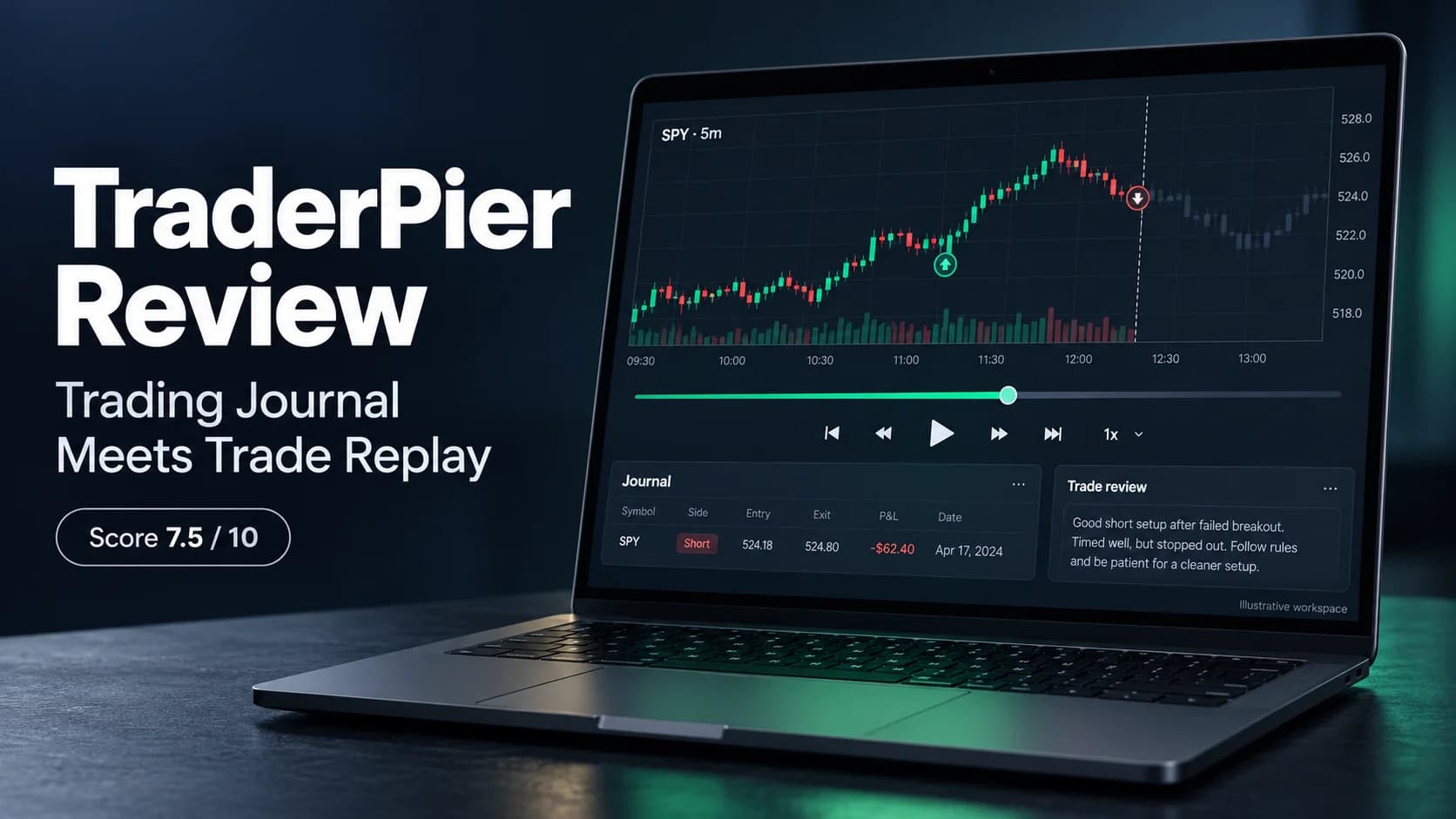
In TraderPier's sample journal, we opened a short SPY trade with a $62.40 net loss. Its note described a boredom entry without a setup. Expanding the row showed that context; pressing Review opened the chart and a timeline of the entry and exit fills.
The replay has play and pause, single-bar stepping, a position slider and speeds from 1× to 8×. We restarted the sample, moved the slider back to the beginning and advanced it one bar. The chart moved with the playback position. You can also open the trade in the main workspace or choose to redo it in replay.
That makes a practical review routine possible. Stop the chart before an entry and AskThe ask is the lowest price a seller is currently willing to accept. When you buy with a market order, you pay the ask.Read definition → what justified it. Advance a few bars and ask whether the trade still fits the plan. You are looking at the sequence of events, rather than drawing a perfect entry on a finished chart.
There is still some hindsight to manage. The review panel displays the recorded trade's final net result, and its timeline lists the fills, with future rows dimmed. It is a tool for examining execution, not a completely blind test. For practice without your own recorded outcome sitting alongside the chart, use the separate Market Replay workspace.
Replay and MAE/MFE answer different questions. Replay lets you revisit the chart; MAE and MFE measure how far a trade moved against you and in your favor while it was open. Those excursion tools sit on the paid plans, so don't choose Free expecting both.
What do you get in the journal itself?
The journal is a table first, which is a sensible place to start. Rows show the date, symbol, direction, quantity, average entry and exit, fees and net P&L. There are also columns for excursions and R, with blanks where the information isn't available. Open a row for its notes and setup, or go straight to Review.
Underneath are an equity curve, a P&L calendar and summary statistics. The public sample contained 10 hypothetical trades, with six winners and four losers. Its $347.90 total agreed with the sum of the displayed trade results, and the averages, Profit FactorProfit factor is the ratio of total gross profit to total gross loss across a set of trades — a profit factor above 1.0 means you're profitable overall, and a ratio of 2.0 means for every $1 lost, you've made $2, giving you a clear, single-Read definition → and ExpectancyExpectancy is the average amount your strategy makes or loses per dollar risked — it's the single best number for evaluating whether your trading approach has a real mathematical edge.Read definition → lined up with those rows at their displayed precision.
One detail made the sample more useful than a tidy green headline: its largest winner contributed $330.25. Remove that one trade and the remaining nine made just $17.65 combined. That isn't a fault in the software. It's the kind of concentration you want a journal to make easy to notice.
The calendar offers month, week and year views. In the journal, trades count on their entry day. The backtest calendar uses a different view of the results, including session P&L with open positions marked at the close. Read those labels before comparing a daily figure with a broker statement.
Playbooks give you a place to keep the rules for a setup and connect journal trades to it. That is more useful than a collection of names such as “BreakoutA breakout is when price moves decisively beyond a defined level — a resistance zone, a consolidation boundary, a chart pattern boundary, or a prior high — suggesting that the previous supply at that level has been overcome.Read definition →” if each name actually describes what had to happen before you entered. The plan comparison reserves automatic rule-adherence scoring for Quant; having a playbook and having the platform score compliance are separate features.
If journaling is new to you, start with our guide to keeping a trading journal. The replay button is valuable, but it can't supply the reason for an entry you never recorded.
How do broker imports work?
You export a CSV from your broker and bring it into the journal. TraderPier doesn't automatically pull your historical journal trades from a connected brokerage account. That remains true even though another part of the platform offers live strategy execution.
Its supported-brokers guide lists Charles Schwab, Fidelity, Interactive Brokers, moomoo, Robinhood, tastytrade, thinkorswim and Webull. Other CSV formats can use column mapping, with a saved format for the next import. The journal includes CSV export too.
The documented import flow gives you a chance to check the matched columns and preview the result before importing. If you're moving from Tradervue, there is a separate catch: its migration guide says existing tags and notes won't transfer. Keep a copy of those records. Losing the explanation behind a trade can matter more than losing a chart.
The important detail is whether your file includes times. The guide marks some activity exports as dates-only, while others include intraday timestamps. For a dates-only file, you need to add the entry and exit times in the trade's Edit view to place them correctly on the chart. Check the timezone as well: an accurate dollar result is not enough for an accurate replay location.
Think about fills as well as trades. A position bought in two pieces and sold in two pieces produces more rows than one simple entry and exit. Export the actual executions, including quantity and fill price, then compare the resulting position size, average prices, fees and P&L with your statement. Don't assume the limit price in an order record is the price you received.
The import interface says the CSV is read in your browser rather than uploaded as a raw file. Saved journal content is still account data, so that message should not be read as a promise that your entire journal remains only on your computer.
How free is the Free plan?
Free is a continuing plan, rather than a short trial. You can try the workspace without an account, then create a free account to keep your work. The signed-out demo has its own smaller allowances; it isn't a complete picture of a registered Free account.
As checked on October 19, 2026, the pricing page showed:
- Plan
- Free
- Monthly / yearly
- $0
- Chart and replay history
- Last 30 weekdays
- Replays per day
- 3
- Journal storage
- 10,000 trades
- Plan
- Trader
- Monthly / yearly
- $29 / $290
- Chart and replay history
- Last 365 weekdays
- Replays per day
- Unlimited
- Journal storage
- 100,000 trades
- Plan
- Quant
- Monthly / yearly
- $79 / $790
- Chart and replay history
- Unlimited
- Replays per day
- Unlimited
- Journal storage
- 500,000 trades
| Plan | Monthly / yearly | Chart and replay history | Replays per day | Journal storage |
|---|---|---|---|---|
| Free | $0 | Last 30 weekdays | 3 | 10,000 trades |
| Trader | $29 / $290 | Last 365 weekdays | Unlimited | 100,000 trades |
| Quant | $79 / $790 | Unlimited | Unlimited | 500,000 trades |
Prices are in USD, before applicable sales tax or VAT. The annual amounts are billed yearly. CSV import/export and trade replay appear on every tier. Trader adds Spyglass, tick/sub-minute charts, excursions and setup analysis; Quant adds deeper analytics, rule scoring and live strategy execution. The advertised AI allowances are about 200 messages monthly on Trader and 500 on Quant. Free requires no card. Subscriptions renew until canceled; cancellation keeps paid access through the billing period, without a prorated refund.
The history window matters more than the storage number if replay is why you're here. You can keep older trades and review their statistics without having chart history available to replay all of them. Selected famous-day demonstrations are also available beyond the normal recent-history window; those examples don't mean an arbitrary old trade is replayable on Free.
For someone reviewing a few recent trades after each session, the free allowance could be enough. If you routinely want to replay every entry and exit from a busy day, you will reach its ceiling quickly. Judge the plan against that routine, rather than the word “free.”
What does Spyglass do?
Spyglass is a conversational assistant built into the workspace. Its suggested prompts include marking gaps on a chart, building an indicator, testing a trading rule and turning a weak journal setup into something you can backtest.
That is a different role from simply writing a report about last month's statistics. The proposed workflow is to identify a pattern, describe a specific change, build the rule and test it on historical data. For example, “I keep losing on this setup” becomes a question about which conditions define that setup and whether changing them survives a test.
Specific rules matter. “Only buy a strong breakout” leaves a lot to interpretation. A rule that defines the range, entry trigger, position size, exit and costs is much easier to inspect. AI can help turn an idea into code, but you still need to check that the resulting strategy represents what you meant.
TraderPier's backtesting overview also describes parameter optimization, cross-symbol checks and walk-forward testing. These help you investigate whether a result survives outside the data or settings that made it look good. They don't turn an attractive historical result into a guarantee. Our AI trading-journal guide explains how to turn this kind of output into a useful review question.
Is the backtester useful alongside the journal?
Yes, particularly if your review ends with a rule you want to examine rather than a promise to “be more disciplined.”
We ran the built-in Opening Range Breakout strategy on NVDA, using five-minute bars across October 13–16, 2026. The test started with a hypothetical $100,000 balance, used the selected balance-based sizing and included commission and slippage. It completed with three closed trades and presented gross results, costs, net results, drawdown and a comparison with holding NVDA.
The useful part was how much of the calculation remained visible. The trade log separated commission and slippage, and the result screen showed the cost deduction between gross and net P&L. A single trade could be opened on the chart. Metrics that needed a longer history, including Sharpe in this run, were left blank with an explanation.
Four days and three trades tell you about the workflow, not whether the strategy works. The page itself flagged the short sample. A serious strategy check needs a broader history, different conditions and realistic execution assumptions. It is still encouraging to see a benchmark and trading costs placed beside a result, rather than hidden behind it.
Backtesting also answers a different question from journal analysis. A backtest asks what a set of rules would have done. Your journal records what you actually did, including the trades you skipped, chased or managed differently. Comparing the two can be useful; treating them as interchangeable would defeat the point.
Does TraderPier connect to a broker?
There are two separate answers. For importing your existing journal history, use CSV. For running a strategy live, Quant supports routing orders to a connected broker.
The broker documentation says live strategies run while TraderPier is open in your browser. It also tells users to check broker availability before upgrading. Don't assume that a broker with a supported CSV format is necessarily ready for live execution.
The terms describe a Dead Man's Switch that can close open positions when the browser tab running a strategy is closed. That behavior matters if you ever move beyond journaling and replay. Read the execution settings and understand what happens when the browser or connection stops before using that part of the platform.
You don't need that feature to get value from the journal. For this review's core use case—reviewing stock trades on a chart—the ability to export your broker history matters more than paying for automated execution.
What happens to your journal data?
TraderPier's privacy policy says trades and strategies remain private and aren't sold or used for the company's own trading. Its terms describe US data storage and account-level export and deletion.
The AI policy deserves a careful read. It says the assistant can read trades, notes, tags and pictures when you ask a question, to answer that question, and that this material is not used to train AI models. Chats remain in your account until deleted. This is broader context than an assistant that receives only summary statistics, so think about what you put in notes and screenshots.
Analytics and advertising measurement are on by default, with an optional switch on the privacy page. The terms separately explain that operational error reporting continues when that switch is off. Turning off marketing measurement doesn't turn off every diagnostic record.
Those controls are worth understanding before adding a long trading history. Keep an export of your records, and avoid putting unrelated personal information in a chart screenshot just because the journal accepts one.
Where does TraderPier fit beside NeoTLog and Dojiwise?
The three products have different centers of gravity.
NeoTLog is a relevant comparison for futures and prop traders who want import-based analytics, multiple accounts and excursion reports. Dojiwise emphasizes readable breakdowns and short AI explanations for crypto and MetaTrader workflows. TraderPier's strongest case is the stock trader who wants the recorded trade and the moving chart in the same review routine.
If replay helps you examine whether your entry and exit followed a plan, it adds something a table alone cannot. If your main need is automatically syncing several brokers, or journaling futures or forex, the fit is weaker regardless of how attractive the replay looks.
Its broader workspace is both a benefit and a trade-off. Having charting, strategy code, backtests and a journal together gives you somewhere to take a finding. It also gives you more panels and decisions than a journal-only tool. Start with the Journal and Review buttons before trying to turn every observation into a coded strategy.
Where does it fall short?
- Market coverage is specific. It is for US stocks and ETFs, so it isn't a universal home for a mixed-market trading history.
- Imports remain a routine. You need broker CSV exports rather than hands-off journal synchronization.
- Better replay needs better source data. Dates-only activity files require time information before the chart can place executions accurately.
- The workspace has more to learn. A trader who only wants notes and a weekly summary may prefer a simpler journal.
What's good
- A trade can be reviewed on a replayed chart directly from the journal.
- Playback controls and an execution timeline make the review process concrete.
- The sample journal can be explored without registering.
- Equity, calendar and expectancy sit alongside individual trade records.
- Backtests expose costs, trade details and a buy-and-hold comparison.
- Paid AI and strategy tools offer a way to investigate journal findings further.
Trade-offs
- US stocks and ETFs only.
- No automatic synchronization of historical journal trades from your broker.
- Dates-only broker exports need additional timestamps for useful execution review.
- A broader and busier interface than a dedicated journal-only product.
Our verdict: worth trying if you will actually use replay
TraderPier's appeal is easy to understand once you open a trade. The result, notes and chart are part of the same review, rather than three things you have to assemble after the session.
We rate it 7.5 out of 10. Replay is its strongest advantage, while manual imports, narrower market coverage and the learning curve keep it from being the easiest journal to recommend to everyone. A stock trader who reviews recent executions still gets a meaningful starting point without paying first. The backtester adds a useful next step when a journal finding can be expressed as a testable rule.
Start with one losing trade you still remember. Check the record, replay the decision and write down what you would need to see before taking it again. If that process gives you a clearer answer than looking at a screenshot, TraderPier is doing something useful for you.
A Practical Stock Journal for Reviewing the Trade on the Chart
TraderPier is a strong fit for US stock and ETF traders who want journal records connected to replay. Free provides a useful starting point, and paid tiers add longer replay history and research tools. Manual CSV imports and a broader workspace are the main compromises.
US stock and ETF traders who review recent executions visually and may want to test rules derived from their journal.
You need automatic journal sync, multi-market coverage, or a simple notes-and-statistics tool without a larger trading workspace.
Frequently asked questions
Is TraderPier's trading journal free?
Can I replay trades on the Free plan?
Does TraderPier automatically sync my broker trades?
Does it support futures, forex, options or crypto journaling?
Is Spyglass included for free?
Can I try TraderPier without creating an account?
Review disclosure: TraderPier lists our free beginner hub on its Partners page and supplied a sample broker-format file. The hands-on examples here use the public guest tools; no paid subscription was supplied for this review.
Disclaimer
Article sources
- TraderPier journal - journal workflow and CSV import overview.traderpier.com
- TraderPier pricing - current plan prices, allowances and feature split, checked October 19, 2026.traderpier.com
- Supported brokers - export formats, timestamp limitations and the distinction between import and live execution.traderpier.com
- Moving from Tradervue - import preview and the limits on transferring notes and tags.traderpier.com
- Backtesting - strategy research and validation tools.traderpier.com
- Privacy policy - journal data, AI context and measurement settings.traderpier.com
- Terms of Service - billing, data export and live execution behavior.traderpier.com
- Public workspace - sample-journal replay and the short backtest described above.traderpier.com