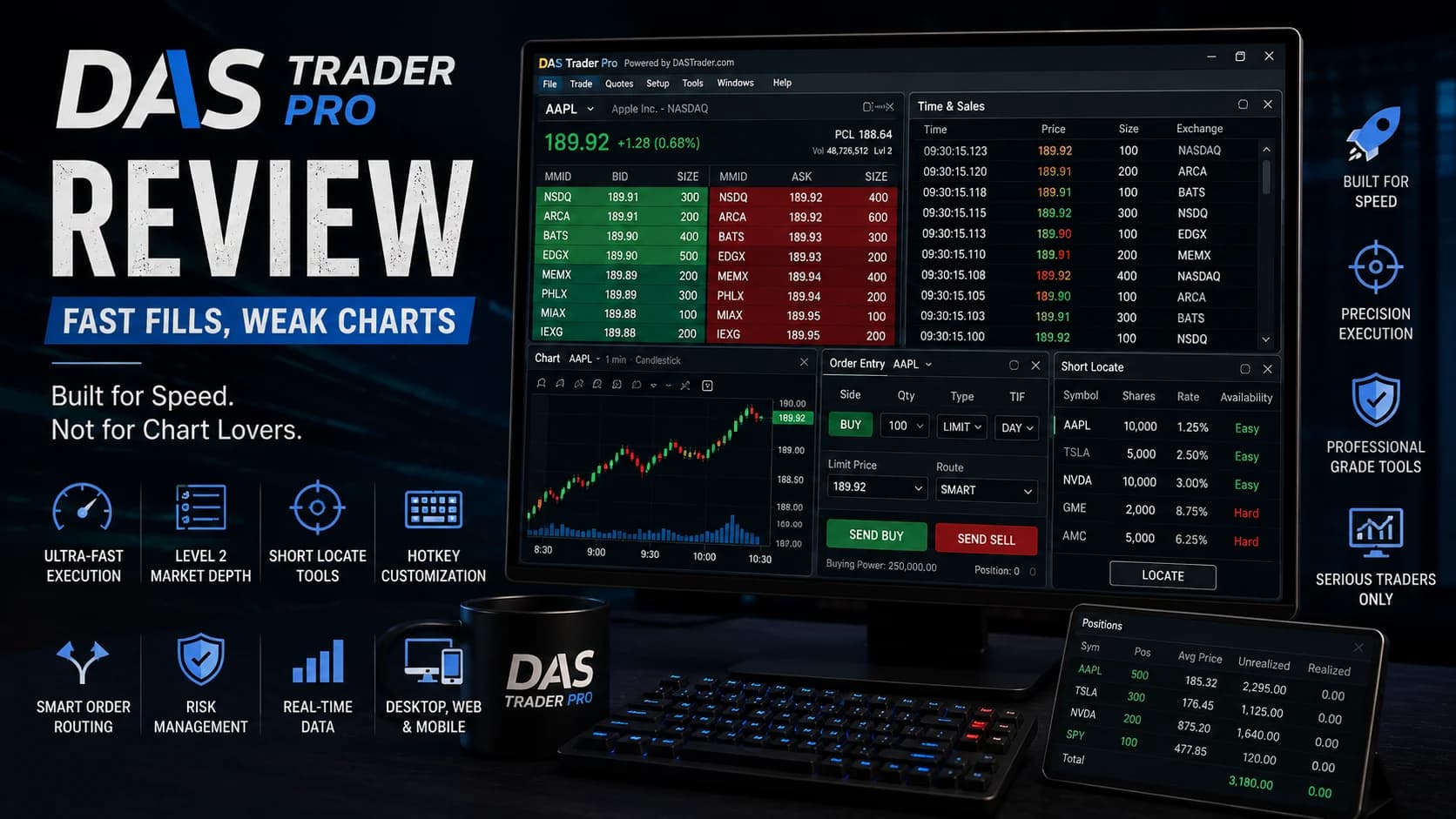
AskThe ask is the lowest price a seller is currently willing to accept. When you buy with a market order, you pay the ask.Read definition → a direct-access day trader what "the software where fills matter" means, and DAS Trader Pro is usually the answer. It's not a broker — it's execution software licensed through a handful of broker-dealers, built around one priority above all others: getting your order to the exchange as fast as possible with maximum control over how it gets there. That focus is genuinely excellent at what it does. It's also the reason DAS costs real money every month and looks noticeably dated the moment you open a chart.
What is DAS Trader Pro? DAS Trader Pro is a direct-access trading platform developed by DAS Inc., licensed through broker-dealers including Interactive Brokers, Lightspeed, Cobra Trading, CenterPoint Securities, and SpeedTrader. It's built around a Level 2 montage window, extensive hotkey customization, and a dedicated short-locate tool, aimed specifically at active and professional day traders who prioritize execution speed and routing control.
This review evaluates DAS Trader Pro against the criteria that matter most for a direct-access execution platform — order routing and speed, short-locate functionality, charting depth, and real-world monthly cost — using DAS's official documentation and independently published reviews and broker pricing pages, not a claimed personal account history.
What's good
- Genuinely elite execution speed and order routing — the montage window combining Level 2 quotes, time and sales, and routing destinations in one place is exactly what direct-access traders mean when they say "fills matter."
- A dedicated short-locate window lets you inquire, price, and accept hard-to-borrow share locates without leaving the platform — a standout feature for short sellers, though it only works through DAS's own broker network.
- Extensive hotkey customization lets traders script nearly any action for split-second execution, a level of control most retail platforms simply don't offer.
- Available across desktop, web, and mobile, and DAS is one of the few mobile trading apps that offers real-time Level 2 DataLevel 2 data shows the full order book — all the bids and asks queued at multiple price levels beyond the inside bid and ask — giving traders visibility into where supply and demand are stacking up before price gets there.Read definition →.
- A 14-day free trial for first-time users, plus simulator packages with market replay, let traders test the platform's workflow before committing to a paid subscription.
Trade-offs
- Genuinely expensive — software fees alone run roughly $100–$130/month depending on broker, before data packages that can add another $15–$115/month, or considerably more for traders with professional status.
- Charting is a real weak point — roughly 40 indicators and a documented inability to display more than about 12 months of price history, meaningfully behind platforms like thinkorswim or even Lightspeed.
- The short-locate feature, one of DAS's most distinctive tools, is disabled entirely on some broker connections, including Interactive Brokers and Schwab — the broker you pick matters as much as the software itself.
- It's explicitly a professional workstation tool with a real learning curve, not built for beginners or casual traders, and it's Windows-native (Mac users need Boot Camp to run it).
What Is DAS Trader Pro? A Closer Look
DAS Trader Pro occupies a specific and unusual position in the day trading software category: it's not a broker, and you can't open an account with DAS directly. It's execution software developed by DAS Inc. and licensed through a set of broker-dealers — Interactive Brokers, Lightspeed, Cobra Trading, CenterPoint Securities, and SpeedTrader among them — meaning the same software looks and behaves identically regardless of which broker you connect it to, but the price, feature availability, and account minimums attached to it vary meaningfully by broker.
That structure matters more than it might first appear. Because DAS is licensed rather than built into any single broker, some broker connections unlock the platform's full feature set while others quietly disable specific tools — the short-locate window, most notably, works only through DAS's own broker network, and independent testing has confirmed it's unavailable on both the Interactive Brokers and Schwab connections. If a specific DAS feature is the reason you want the platform, the broker you connect it through determines whether you'll actually get it.
At its core, DAS Trader Pro is order-entry software first and everything else second. The platform's design reflects that priority directly: a montage window puts Level 2 quotes, time and sales, and order routing side by side, hotkeys can script nearly any action, and the whole system is built to minimize the time between deciding to trade and the order reaching the exchange.
Key Features
The Montage Window. This is DAS's central interface — Level 2 BidThe bid is the highest price a buyer is currently willing to pay. When you sell with a market order, you receive the bid price.Read definition →/ask data, time and sales, and order routing all visible and actionable in one window, with color-coded pricing for fast visual scanning. It's the feature independent reviews point to when they say DAS is built specifically for traders who care about fills.
Hotkey Customization. DAS supports deep hotkey scripting, letting active traders bind nearly any action — buying or selling at a specific bid or ask, pulling up a chart, canceling all orders — to a single keystroke. For a scalper or high-frequency day trader, this level of customization measurably speeds up execution compared to a mouse-driven retail platform.
Short-Locate Window. A dedicated tool for inquiring about, pricing, and accepting locates on hard-to-borrow shares without leaving the platform — a genuine differentiator for active short sellers. The important caveat: this feature depends on which broker you're connected through, and it's specifically disabled on the Interactive Brokers and Schwab connections. Traders who specifically want this functionality need to confirm it's active on their chosen broker before assuming it will be available.
Charting. This is DAS's clearest weak point. The platform includes roughly 40 technical indicators and customizable drawing tools, but independent testing has found it can't display more than about 12 months of price history on a chart — a real limitation for anyone who wants to study longer-term context alongside an intraday setup. Compared to charting-forward platforms like thinkorswim, DAS's charts function but don't compete on depth.
Multi-Platform Access. Beyond the flagship desktop software, DAS offers web and mobile versions. Notably, DAS's mobile app is one of the few in the category to offer real-time Level 2 data on a phone, letting active traders monitor market depth away from their main workstation.
Simulator and Replay Mode. DAS offers simulator packages with a real-time practice environment, and market replay functionality — but replay is only available on simulator packages, and even then it's limited to non-market hours on live trading environments. A 14-day free trial is available for first-time users who want to test the platform before subscribing.
DAS Trader Pro is built for execution, not stock discovery — it has no built-in scanning or AI-driven signal generation, and traders relying on it for order entry typically pair it with a separate tool to actually find what to trade. Trade Ideas is a common pairing specifically because it handles the scanning and signal-generation side that DAS doesn't attempt to cover, letting a trader scan with one tool and execute with the other. DayTradingToolkit's Trade Ideas review covers what that scanner looks like in more detail, and you can explore Trade Ideas directly if pairing a dedicated scanner with your DAS execution workflow is something you're considering.
Who DAS Trader Pro Is Best For
DAS Trader Pro earns its reputation for a narrow, specific kind of trader, and independent reviews are consistent about who that is.
It's a strong fit if you're an active or professional-level day trader who executes meaningful VolumeVolume is the total number of shares (or contracts) traded during a given time period — it's the primary confirmation tool for all price action, because a price move accompanied by high volume indicates genuine market participation, while tRead definition → and specifically needs direct market access, granular order routing control, and hotkey-driven execution speed — the trader for whom the difference between a good FillA fill is the execution of an order — when your buy or sell order is matched with a counterparty and the transaction is completed, you've received a fill.Read definition → and a great one genuinely matters to results. It's also a strong fit if short-selling and hard-to-borrow locates are a regular part of your strategy, provided you connect through a broker where that feature is actually enabled.
It's a weaker fit if you trade a handful of times a week, are still learning the mechanics of day trading, or want strong native charting without pairing in a separate tool. The math is also worth being honest about: a $100–$130 monthly software fee plus data packages is a real, fixed cost that has to be earned back through trading before it becomes worthwhile — a meaningfully different proposition on a small account than on a well-capitalized one.
DAS Trader Pro Pricing
DAS Trader Pro's cost depends heavily on which broker you connect through, since pricing, fee waivers, and account minimums are all set by the broker rather than by DAS itself:
- Broker
- Interactive Brokers
- Monthly Software Fee
- ~$100/month
- Fee Waiver Threshold
- Not waived by volume
- Notes
- Short-locate feature disabled
- Broker
- Lightspeed
- Monthly Software Fee
- ~$130/month
- Fee Waiver Threshold
- Waived at high volume
- Notes
- $50,000 account minimum
- Broker
- Cobra Trading
- Monthly Software Fee
- ~$125/month
- Fee Waiver Threshold
- Waived at 200,000 shares/month
- Notes
- Data from ~$20/month
- Broker
- Other DAS-network brokers
- Monthly Software Fee
- ~$100–$130/month
- Fee Waiver Threshold
- Varies by broker
- Notes
- Short-locate typically active
| Broker | Monthly Software Fee | Fee Waiver Threshold | Notes |
|---|---|---|---|
| Interactive Brokers | ~$100/month | Not waived by volume | Short-locate feature disabled |
| Lightspeed | ~$130/month | Waived at high volume | $50,000 account minimum |
| Cobra Trading | ~$125/month | Waived at 200,000 shares/month | Data from ~$20/month |
| Other DAS-network brokers | ~$100–$130/month | Varies by broker | Short-locate typically active |
Beyond the software fee, expect separate market data packages ranging from roughly $15–$115/month for non-professional status, and considerably more — commonly cited in the $300–$550+/month range — for traders with professional designation. Commissions are typically tiered per-share pricing on top of the platform fee, separate from the software cost itself. Given how much these numbers vary by broker, it's worth running the full math — software fee, data package, and expected commission volume — against your specific trading pattern before committing to a broker-DAS combination.
What Works Well
Execution quality is DAS's entire reason for existing, and it delivers on that promise. The montage window's integration of Level 2, time and sales, and routing in a single actionable view is exactly the kind of tool serious direct-access traders mean when they talk about controlling their fills rather than accepting whatever a simpler platform gives them.
The short-locate window deserves specific credit as a genuinely useful, hard-to-find feature — being able to inquire, price, and accept a locate on a hard-to-borrow stock without leaving your trading platform meaningfully speeds up a workflow that's often clunky elsewhere. The caveat about broker-dependent availability doesn't diminish how good the feature is when it's active.
Hotkey depth and mobile Level 2 access round out a genuinely strong execution-focused toolkit. Few platforms in this category let you script this much of your workflow to keystrokes, and real-time Level 2 on mobile is a rare inclusion most competitors reserve for desktop only.
Limitations
Two limitations are worth weighing seriously before committing to a DAS subscription.
Charting is a documented, real weak point, not a minor nitpick. Being unable to display more than roughly 12 months of price history is a genuine constraint for any trader who wants longer-term context on the same chart as an intraday setup, and the indicator set, while functional, doesn't approach what a charting-forward platform offers. Most DAS users end up pairing it with a separate charting tool for anything beyond immediate intraday levels.
The cost structure is real and needs to be run through actual math before committing. A $100–$130 monthly software fee, plus data, is a fixed cost regardless of how your trading goes that month — on a smaller account, that can represent a meaningful percentage drag before a single commission is paid. Traders considering DAS should model the total monthly cost against their expected trading volume and account size specifically, rather than treating the "per-share commission" headline as the whole picture.
Verdict
DAS Trader Pro Is Worth It for High-Volume Traders Who Prioritize Execution Above Charting
DAS Trader Pro delivers genuinely elite execution speed, routing control, and short-locate functionality for traders who need those specific things and are willing to pair it with a separate charting or scanning tool. The real monthly cost and dated charting are documented, meaningful tradeoffs, and the fact that some features vary by broker connection adds a layer of research most platforms don't require. Active, high-volume traders who prioritize fills and locate access above all else get real value from DAS; traders who want strong native charting or lower fixed costs will be better served elsewhere.
Active and professional-level day traders who prioritize execution speed, order routing control, and short-locate access above native charting depth or low fixed cost.
Frequently Asked Questions
Is DAS Trader Pro good for day trading?
DAS's montage window and hotkey depth give serious direct-access traders a level of execution control most retail platforms don't offer. Traders who want strong native charting or a lower fixed monthly cost may find the tradeoff less favorable. Key Takeaway: DAS rewards traders who specifically value execution quality enough to justify its cost and charting limitations.
How much does DAS Trader Pro actually cost?
Professional-status traders pay considerably more for data, commonly cited in the $300–$550+/month range. Commissions are charged separately on top of the software and data fees, so the full monthly cost is higher than the software fee alone suggests. Key Takeaway: Add software fee, data package, and expected commissions together before evaluating whether DAS fits your budget.
Can I use DAS Trader Pro with any broker?
Pricing, account minimums, and even which specific DAS features are enabled vary by broker, since DAS licenses the software rather than operating it as a standalone brokerage. Confirm both pricing and feature availability with your specific intended broker before subscribing. Key Takeaway: Research your specific broker's DAS terms directly, since cost and available features aren't identical across every DAS-supported broker.
Does DAS Trader Pro's short locate feature work with every broker?
If locate access for hard-to-borrow shares is a primary reason you want DAS, this is worth confirming directly before choosing a broker, since the feature you came for may not be active on every connection. Key Takeaway: Confirm short-locate availability with your specific broker before assuming this feature will work on your account.
Is DAS Trader Pro good for beginners?
A newer trader is generally better served building experience and trading volume on a lower-cost, more guided platform before considering a direct-access tool like DAS, where the fixed monthly cost has to be earned back regardless of how the trading goes. Key Takeaway: Build trading volume and experience elsewhere first; consider DAS once your strategy and volume specifically call for direct-access execution.
Does the old $25,000 day trading rule still apply when using DAS Trader Pro?
Some DAS-supported brokers have published day-trading account minimums in the $10,000 range post-rule-change, while others (like Lightspeed) maintain higher minimums as their own business policy. DayTradingToolkit's complete guide to the PDT rule elimination covers what changed regulatorily and what individual brokers still require on their own. Key Takeaway: Check your specific DAS-supported broker's current account minimum directly, since it's set by the broker rather than by the eliminated regulatory rule.
Does DAS Trader Pro pair well with a scanner like Trade Ideas?
This is a common structural pairing in the direct-access trading world: one tool for discovery, another for execution. DayTradingToolkit's Trade Ideas review covers how that kind of scanner-plus-execution workflow typically works. Key Takeaway: DAS handles execution exceptionally well but isn't built for stock discovery — pair it with a dedicated scanner if that's part of your workflow.
Can I use DAS Trader Pro on a Mac?
Traders on Mac hardware without Boot Camp configured should factor in that setup step before assuming DAS will run out of the box. Key Takeaway: Mac users need Boot Camp configured before installing DAS Trader Pro; there's no native macOS version.
Does DAS Trader Pro have a free trial or simulator?
Replay mode specifically is limited to simulator packages and is only available during non-market hours on live trading environments, so it's a practice tool rather than something usable to review same-day live trading sessions in real time. Key Takeaway: Use the 14-day trial and simulator packages to test DAS's workflow and hotkey setup before committing to a paid broker-DAS combination.
What are DAS Trader Pro's biggest limitations?
A secondary limitation worth knowing is that some of DAS's most distinctive features, like short-locate access, aren't available on every broker connection, adding a layer of broker-specific research most platforms don't require. Key Takeaway: Weigh DAS's execution strengths against its charting depth, real cost, and broker-dependent feature set before subscribing.