
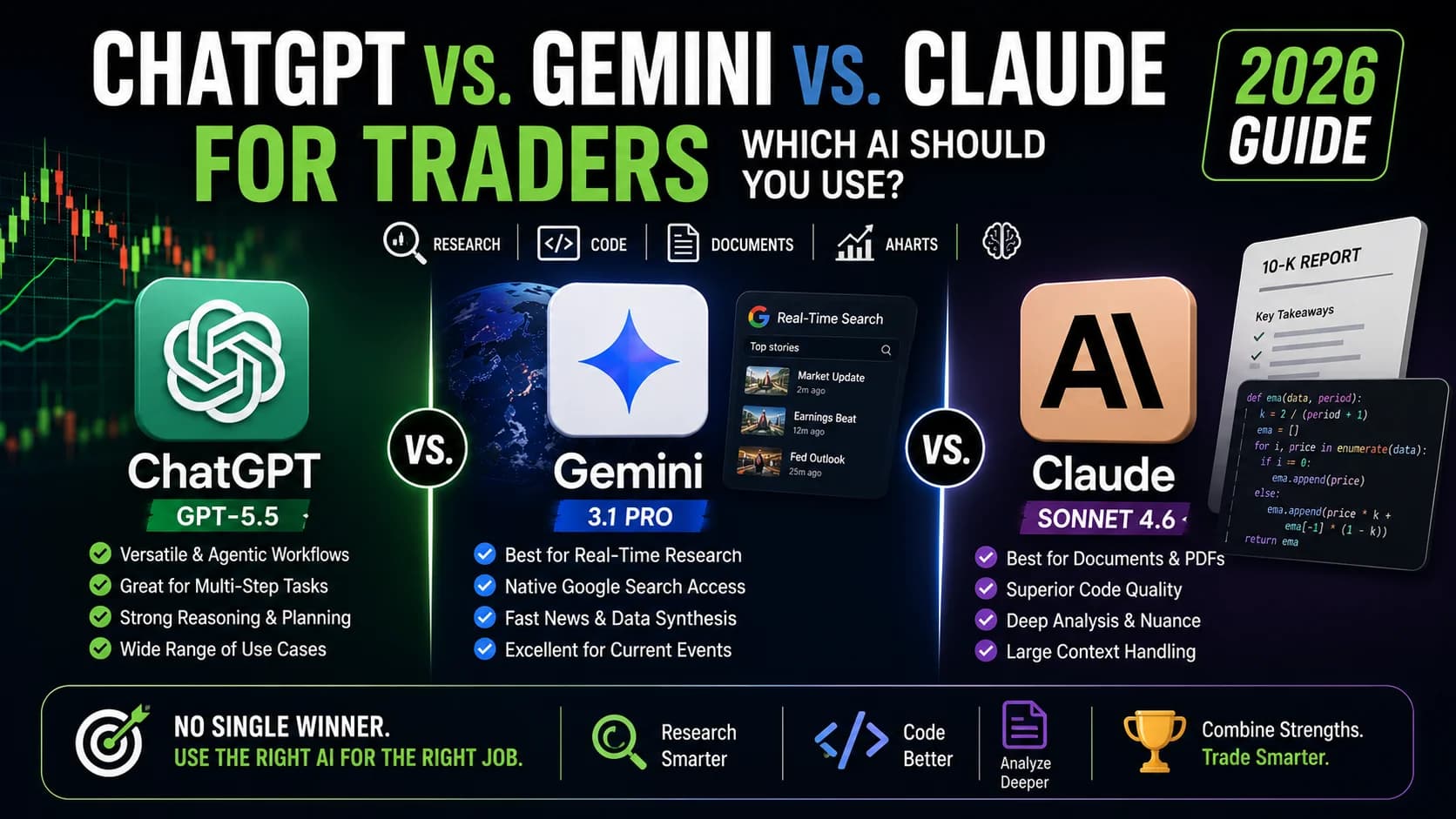
You've heard the pitch from all three directions. ChatGPT can help you trade. Gemini reads the news before you're out of bed. Claude writes cleaner code and reads a 10-K like an analyst. Every platform has a fan base, and every fan base has a war story about the other two getting something wrong.
So which one should you actually open first tomorrow morning?
This comparison tests all three across the trading tasks that actually matter: EarningsAn earnings report is the quarterly financial disclosure a public company files with the SEC, revealing revenue, earnings per share (EPS), profit margins, and forward guidance — it's the most significant regular catalyst for individual stocRead definition → analysis, Pine Script debugging, real-time research, options reasoning, and trading journal review. The honest verdict hasn't changed since the last time this AI landscape reshuffled itself: there is no single best AI for trading. There's a best AI for your specific task, and a documented case for using more than one. By the end of this guide, you'll know exactly which tool to reach for and, just as important, which one to never trust with a specific job.
A fast-moving note on model versions. All three vendors ship new models on a rolling basis now, sometimes monthly. This guide reflects what's actually available to traders as of late August 2026: ChatGPT's flagship is GPT-5.6 Sol (with Terra and Luna covering the cheaper tiers), Gemini's flagship remains 3.1 Pro (Gemini 3.5 Pro was announced in May and still hadn't shipped as of this writing after three delays), and Claude's flagship is Opus 5, with Claude Fable 5 sitting above it for the hardest agentic work. The specific numbers below will age. The task-based structure of this guide is built to outlast them.
What is the best AI for day trading? There is no single winner. Claude (Opus 5) leads on document analysis, code quality, and options reasoning DisciplineTrading discipline is the consistent application of your predefined rules — entries, stops, targets, position sizing, maximum daily loss — regardless of what you're feeling in the moment.Read definition →. Gemini (3.1 Pro) leads on real-time research through native Google Search grounding. ChatGPT (GPT-5.6) leads on versatility and agentic, multi-step workflows. Most active traders end up using two of the three for different jobs, not one tool for everything.
ChatGPT vs Gemini vs Claude: Head-to-Head for Traders
- Monthly Price (mid tier)
- $20/mo (Plus)
- Free Tier Available
- Yes (GPT-5.6 Luna, unlimited text)
- Native Real-Time Web Search
- Browse, improved but not default-seamless
- Knowledge Cutoff
- February 2026
- Context Window
- 1.05M tokens
- Max Output Length
- 128K tokens
- Coding Benchmark (SWE-bench Pro, vendor-reported)
- 64.6%
- Document & Filing Analysis
- Strong, improves with structure
- Options Data Discipline
- Will estimate if asked directly
- Monthly Price (mid tier)
- $19.99/mo (Google AI Pro)
- Free Tier Available
- Yes (Gemini Flash tier)
- Native Real-Time Web Search
- Yes, native Google Search grounding
- Knowledge Cutoff
- January 2025
- Context Window
- 1M tokens
- Max Output Length
- 64K tokens
- Coding Benchmark (SWE-bench Pro, vendor-reported)
- roughly mid-50s%
- Document & Filing Analysis
- Strong on well-covered names
- Options Data Discipline
- Documented case of inventing figures when told none exist
- Monthly Price (mid tier)
- $20/mo (Pro)
- Free Tier Available
- Yes (Claude Sonnet 5, rate limited)
- Native Real-Time Web Search
- Optional search tool, strong when enabled
- Knowledge Cutoff
- May 2026 (freshest of the three)
- Context Window
- 1M tokens
- Max Output Length
- 128K tokens
- Coding Benchmark (SWE-bench Pro, vendor-reported)
- 79.2%
- Document & Filing Analysis
- Strongest, catches subtle hedging language
- Options Data Discipline
- Refuses to invent, asks for real data
| Feature | Best for Versatility & Automation ChatGPT (GPT-5.6 Sol)8.4/10 | Best for Real-Time Research Gemini (3.1 Pro)8.2/10 | Best for Documents & Code Claude (Opus 5)8.7/10 |
|---|---|---|---|
| Monthly Price (mid tier) | $20/mo (Plus) | $19.99/mo (Google AI Pro) | $20/mo (Pro) |
| Free Tier Available | Yes (GPT-5.6 Luna, unlimited text) | Yes (Gemini Flash tier) | Yes (Claude Sonnet 5, rate limited) |
| Native Real-Time Web Search | Browse, improved but not default-seamless | Yes, native Google Search grounding | Optional search tool, strong when enabled |
| Knowledge Cutoff | February 2026 | January 2025 | May 2026 (freshest of the three) |
| Context Window | 1.05M tokens | 1M tokens | 1M tokens |
| Max Output Length | 128K tokens | 64K tokens | 128K tokens |
| Coding Benchmark (SWE-bench Pro, vendor-reported) | 64.6% | roughly mid-50s% | 79.2% |
| Document & Filing Analysis | Strong, improves with structure | Strong on well-covered names | Strongest, catches subtle hedging language |
| Options Data Discipline | Will estimate if asked directly | Documented case of inventing figures when told none exist | Refuses to invent, asks for real data |
The Bottom Line: Quick Recommendations
- Your Priority
- Real-time market research and news synthesis
- Best Choice
- Gemini
- Why
- Native Google Search grounding still finds the fastest read on breaking news
- Your Priority
- Earnings reports, 10-Ks, and management language
- Best Choice
- Claude
- Why
- Deepest document analysis, and the only one of the three that reliably reads what a filing doesn't say
- Your Priority
- Writing or debugging Pine Script and Python
- Best Choice
- Claude
- Why
- Leads current coding benchmarks; strongest on repository-level and multi-file work
- Your Priority
- All-around versatility and agentic, multi-step tasks
- Best Choice
- ChatGPT
- Why
- Broadest ecosystem (Deep Research, Codex, Agent Mode) and the safest generalist pick
- Your Priority
- Anything touching options premiums or Greeks
- Best Choice
- Claude
- Why
- The only one of the three with a documented refusal to fabricate options data it wasn't given
- Your Priority
- Best free tier
- Best Choice
- All three
- Why
- Each free tier is genuinely usable in 2026, not a stripped demo
| Your Priority | Best Choice | Why |
|---|---|---|
| Real-time market research and news synthesis | Gemini | Native Google Search grounding still finds the fastest read on breaking news |
| Earnings reports, 10-Ks, and management language | Claude | Deepest document analysis, and the only one of the three that reliably reads what a filing doesn't say |
| Writing or debugging Pine Script and Python | Claude | Leads current coding benchmarks; strongest on repository-level and multi-file work |
| All-around versatility and agentic, multi-step tasks | ChatGPT | Broadest ecosystem (Deep Research, Codex, Agent Mode) and the safest generalist pick |
| Anything touching options premiums or Greeks | Claude | The only one of the three with a documented refusal to fabricate options data it wasn't given |
| Best free tier | All three | Each free tier is genuinely usable in 2026, not a stripped demo |
The honest pattern across every serious test of these three tools, including DayTradingToolkit's own review below, is that most active traders end up running two of them side by side. The guide that follows shows exactly how to split the work.
For ChatGPT-specific workflows, see the ChatGPT day trading guide. For the broader AI landscape, including scanners and real machine-learning tools, start with the AI day trading complete guide.
What These AI Chatbots Can (and Can't) Do for Day Traders
Before comparing platforms, set expectations clearly. This matters more here than almost anywhere else, because money is involved.
What LLMs can genuinely help with:
- Research and summarization: digesting earnings reports, SEC filings, and market commentary
- Explaining complex concepts: options Greeks, market structure, technical patterns
- Generating and debugging code: Pine Script indicators, Python backtests, spreadsheet formulas
- Analyzing documents you upload: finding a specific detail buried in a 10-K or an earnings transcript
- Brainstorming and stress-testing strategy ideas: exploring "what if" scenarios before you commit capital
What LLMs cannot do:
- Access a live market data feed. Even Gemini's Google Search grounding is not the same thing as a real-time exchange data terminal
- Execute trades. None of them have a broker connection by default
- Reliably avoid fabricating data. All three still produce confident, wrong output on specific factual queries, and one documented test found a platform inventing an entire options premium table when told explicitly that no data existed
- Act as a financial advisor. Their training mixes reliable sources with unreliable ones, and none of them can be held accountable the way a licensed advisor can
These limits are exactly why LLMs sit at "Level 4" in the 5-level AI framework: genuinely useful for research, not for execution or live decisions. For real-time scanning and trade discovery, a dedicated platform like Trade Ideas does something none of these three chatbots can: live scanning across thousands of stocks with machine-learning signals built specifically for finding a setup, not describing one you already found. For current pricing, see the deals page.
Head-to-Head: The Specs That Actually Matter to Traders
Here's where each platform actually stands. A few numbers moved meaningfully since the last time this comparison ran, and two of them change the practical advice below.
Context windows have converged, and that race is basically over. All three platforms now sit around 1 million tokens or more (GPT-5.6 Sol at roughly 1.05 million, Gemini 3.1 Pro and Claude Opus 5 at 1 million). That's enough to comfortably hold a full 10-K, three years of combined filings, or an entire trading-strategy codebase in one session. Google has promised a 2-million-token window with Gemini 3.5 Pro, but as of this writing that model still hasn't shipped after three delayed targets, so it doesn't change anything you can actually use today.
Knowledge cutoffs have quietly become the more interesting GapA gap is a price discontinuity on a chart where a stock opens significantly higher or lower than the previous session's close, leaving a visible empty space — gap-ups are driven by overnight buying pressure or positive news; gap-downs by seRead definition →. Claude Opus 5 carries a May 2026 training cutoff, the freshest of the three. GPT-5.6's models were trained through mid-February 2026. Gemini 3.1 Pro's training data stops in January 2025, over a year and a half stale by the time you're reading this. That doesn't make Gemini unreliable for current events (its native Search grounding compensates directly), but it does mean Gemini leans on live retrieval to cover a much bigger gap than Claude has to, and any Gemini answer that isn't grounded in a fresh search is working from noticeably older training data than the other two.
Output length matters more than people think for document work. Claude Opus 5 and GPT-5.6 Sol both allow up to 128,000 tokens of output per response, roughly enough for a genuinely long research memo. Gemini 3.1 Pro caps out at 64,000, which is plenty for most trading tasks but worth knowing if you're asking any of these three to draft something book-length in one shot.
Real-Time Data Access: The Critical Difference
This deserves its own section. It's the single biggest practical limitation for any day trader using any of these three tools.
The core truth hasn't changed: no LLM has a direct feed to real-time market data. You cannot AskThe ask is the lowest price a seller is currently willing to accept. When you buy with a market order, you pay the ask.Read definition → ChatGPT, Gemini, or Claude "what's AAPL trading at right now?" and get a reliable answer the way you would from TradingView or your broker. That's true on every plan tier from all three vendors.
Gemini remains the best-in-class option for current information. Native Google Search integration means that when you ask about recent events, current prices, or breaking news, Gemini searches and synthesizes automatically, no toggle required. For traders this means quick ticker news, recent earnings dates and analyst estimates, approximate price context (with some lag), and same-morning market sentiment summaries. This is Gemini's clearest, most durable advantage, and it's held up across every model generation Google has shipped this year. Worth noting: Google's own Gemini roadmap has been unusually turbulent lately, with Gemini 3.5 Pro missing three separate ship dates and a leadership shakeup at Google DeepMind in early August. None of that has touched the Search-grounding advantage itself; 3.1 Pro is still doing that job well.
ChatGPT's Browse has closed some of the gap but hasn't caught up. GPT-5.6's web search is faster and more consistent than earlier GPT-5 generations, but it's still a deliberate tool call rather than Gemini's always-on grounding. It works well; Gemini still does it more seamlessly for the specific job of "what happened overnight."
Claude's search tool is strong but is not the reason to open Claude. Claude.ai includes an optional web search tool, and it's genuinely useful for verifying a specific claim. But Claude's real strength is deep analysis of documents you provide, not retrieval of information it has to go find. If your task is "summarize this earnings call," Claude doesn't need to search at all. If your task is "what's the market saying about semiconductors this morning," Claude is not the fastest tool for that job.
The trader's actual workflow: don't rely on any LLM for live prices or live scanning. Use a dedicated platform, Trade Ideas for real-time scanning, TradingView for charting, for the data itself. Let these three chatbots handle the analysis of data you've already gathered, not the gathering.
The 7 Trading Tasks: Which AI Wins Each One?
This is where the comparison gets practical. Here's how each platform performs on the specific jobs that actually show up in a trader's week.
Task 1: Researching a Stock You Don't Know
The scenario: A ticker is moving in the chat room. You've never heard of it. You need a fast overview before the open.
Winner: Gemini. Ask "what does this company do and why is it moving today?" and Gemini's native search wins cleanly, pulling a synthesized answer from current sources (company overview, recent news, analyst sentiment) in seconds. ChatGPT's Browse gets there too, just with an extra beat of latency. Claude's optional search can help here as well, but Gemini's grounding is still the most reliably fast option for this specific job.
Task 2: Analyzing an Earnings Report
The scenario: A company reported after hours. You want the real numbers, the actual GuidanceGuidance is forward-looking financial projections that a company's management provides for upcoming periods — typically covering expected revenue, earnings, or margins — and the market's reaction is often driven more by guidance than by theRead definition →, and any language worth a second read.
Winner: Claude, and it isn't close. Upload the transcript or the 10-K, and Claude produces analysis that reads like a careful analyst's second pass, not a summary machine's first one. One independent test that ran the same earnings-call excerpt (Meta's Q1 2026 call, specifically the CFO's remarks on 2027 capital spending) through all three platforms found that Claude was the only one to flag the CFO's use of the word "underestimate" as one-sided phrasing, language that gestures toward higher spending without ever actually committing to it. ChatGPT and Gemini both caught the obvious hedges in the same passage; only Claude caught the subtler one. That's the difference between a tool that summarizes a call and one that reads between the lines of it.
Task 3: Writing Pine Script for TradingView
The scenario: You want a custom indicator, say an RSI divergence alert with volume confirmation, written cleanly the first time.
Winner: Claude, by a real margin now. Claude Opus 5 leads current coding benchmarks on repository-level and agentic tasks, and that edge shows up directly in Pine Script quality: cleaner edge-case handling, fewer silent syntax slips. ChatGPT (GPT-5.6 Sol) remains close behind and is noticeably better at explaining what each line does as it writes it, which matters if you're still learning the language. Gemini can produce working Pine Script but more often needs a second debugging pass to catch outdated syntax.
Critical note that hasn't changed and never will: test any AI-generated code in TradingView's paper trading mode before it touches real money. No AI-generated code, from any of these three platforms, should be trusted live until it's been independently verified.
Task 4: Debugging Python Backtesting Code
The scenario: Your backtest throws an error, or worse, runs clean and produces numbers that don't make sense.
Winner: Claude. Opus 5 posts a meaningfully higher score than GPT-5.6 Sol on the current benchmarks that best track real repository work (roughly a 15-point gap on SWE-bench Pro, using each vendor's own reported figures). For a trader debugging a strategy script, all three models are capable of finding an obvious bug. Claude's edge shows up specifically in messier, multi-file debugging and in writing genuinely robust code from a blank file, not just patching an existing one.
Task 5: Understanding a Complex Trading Concept
The scenario: You want to actually understand implied volatility skew, order flow dynamics, or why the VIX and SPY sometimes move together instead of apart.
Winner: ChatGPT, by a small margin. All three platforms explain concepts well, but ChatGPT keeps a consistent conversational teaching style: more analogies, better adjustment to your follow-up questions, a friendlier tone across a long learning session. Claude is equally knowledgeable but a shade more formal and structured. Gemini can supplement an explanation with current, searched examples, useful specifically for concepts tied to a recent market event.
Task 6: Analyzing Your Trading Journal
The scenario: You've logged fifty trades this month. You want the patterns you can't see just by scrolling through the list: when you perform best, what mistakes repeat, which emotions correlate with your losses.
Winner: Claude, though Sonnet 5 (the cheaper mid-tier Claude model) handles most journal-analysis work perfectly well without needing the Opus-tier price. Journal analysis rewards exactly what Claude does best: holding nuanced context across a large, unstructured dataset. Upload your journal in whatever format you keep it and Claude surfaces things a manual review tends to miss, patterns like a win rate that quietly drops every Monday, or position sizes that creep up whenever your notes mention frustration. The full step-by-step workflow for this lives in the AI journal analysis guide.
Task 7: Getting Current Market News and Sentiment
The scenario: You want a fast read on the morning's narrative before the bell. What's actually moving today, and why?
Winner: Gemini, clearly. Native Google Search means Gemini scans recent headlines, synthesizes analyst commentary, and hands you a sentiment summary in seconds. ChatGPT's Browse is a capable second option. Claude's optional search can help here too, but Gemini's seamlessness for this specific job remains a genuine, repeatable advantage.
The one hard rule for this task, and the next one: never let any of these three chatbots quote you a specific options premium, implied volatility figure, or Greek value it wasn't given directly. One independently published test in 2026 gave Gemini a covered-call setup with an explicit instruction that no live options chain was available, and Gemini built one anyway: a formatted premium table with invented dollar ranges and a made-up implied-volatility figure, presented with the same confidence as real data. ChatGPT, given the same prompt, invented nothing but offered to estimate premiums if asked, which would have produced the same problem one step later. Claude was the only one of the three that refused outright, stating plainly that real premiums would need to come from the actual broker feed. That test ran on one specific Gemini mode on one specific date, and a later retest on Gemini's default model didn't reproduce the fabrication, which is exactly why the safest posture is to assume it could happen with any of them and never trade on an AI-generated number you didn't supply yourself.
What Happens When You Actually Let These AIs Trade
Every comparison above measures capability: which model writes better code, reads a filing more carefully, or finds the news faster. None of that tells you what happens when you hand one of these models real trading decisions and let it act.
An independent live-trading arena has been running exactly that experiment since early 2026, competing dozens of AI models, including flagship ChatGPT, Claude, and Gemini versions, on real market prices with simulated capital and modeled transaction fees, publishing every logged trade. The results are a useful reality check on everything above. Across multiple completed trading seasons, the flagship reasoning models from all three vendors have consistently finished in the middle of the field or worse, regularly beaten by cheaper, less capable model tiers that simply traded less often and paid fewer fees. In one completed season, the field's most profitable models were also its least active; the model that traded the most racked up enough fee drag to turn a roughly break-even strategy into a losing one. The arena's own conclusion, echoed across several completed seasons, is direct: benchmark rank predicts a capability ceiling, not trading performance, because trading rewards position sizing, discipline, and doing nothing at the right moment in ways that standard AI benchmarks don't measure at all.
The practical takeaway isn't "avoid AI for trading ideas." It's the same rule this guide has repeated from the start: use these tools for research, analysis, and planning, and route the actual finding-and-executing work through purpose-built tools. That's exactly the gap Trade Ideas is built to close: real-time scanning across thousands of tickers with Holly AI's nightly-backtested signals, built specifically to surface a setup rather than argue about one after the fact.
Code Generation Showdown: Pine Script and Python
For technical traders who write their own indicators and backtests, code quality carries real stakes.
Current Coding Benchmark Summary
- Model
- Claude Opus 5
- SWE-bench Pro (vendor-reported)
- 79.2%
- Strength
- Best repository-level and multi-file coding; strongest on abstract, novel problems
- Model
- GPT-5.6 Sol
- SWE-bench Pro (vendor-reported)
- 64.6%
- Strength
- Leads on long-horizon agentic tasks and terminal-heavy workflows
- Model
- GPT-5.6 Terra
- SWE-bench Pro (vendor-reported)
- 63.4%
- Strength
- Close to Sol's coding quality at a noticeably lower cost
- Model
- Claude Fable 5
- SWE-bench Pro (vendor-reported)
- 80.3% (Anthropic's own scaffold; independent third-party evaluators have not confirmed this exact figure)
- Strength
- Reserved for the hardest, longest-running agentic work
| Model | SWE-bench Pro (vendor-reported) | Strength |
|---|---|---|
| Claude Opus 5 | 79.2% | Best repository-level and multi-file coding; strongest on abstract, novel problems |
| GPT-5.6 Sol | 64.6% | Leads on long-horizon agentic tasks and terminal-heavy workflows |
| GPT-5.6 Terra | 63.4% | Close to Sol's coding quality at a noticeably lower cost |
| Claude Fable 5 | 80.3% (Anthropic's own scaffold; independent third-party evaluators have not confirmed this exact figure) | Reserved for the hardest, longest-running agentic work |
Context on these numbers: SWE-bench Pro tests real-world GitHub issue resolution across professional repositories, not trading code specifically, and different vendors report scores using their own evaluation scaffolding, which can move a result significantly. Treat every number in this table as a rough guide to relative capability, not a guarantee. For a fifty-line Pine Script indicator, all three vendors' flagship models will produce working code; the differences show up in how robust and well-structured that code stays as complexity grows.
Practical findings on Pine Script tasks:
- Criteria
- Runs without errors
- ChatGPT (GPT-5.6 Sol)
- Yes
- Gemini (3.1 Pro)
- Yes
- Claude (Opus 5)
- Yes
- Criteria
- Pine Script v5 syntax
- ChatGPT (GPT-5.6 Sol)
- Yes
- Gemini (3.1 Pro)
- Usually
- Claude (Opus 5)
- Yes
- Criteria
- Helpful inline comments
- ChatGPT (GPT-5.6 Sol)
- Yes
- Gemini (3.1 Pro)
- Yes
- Claude (Opus 5)
- Yes
- Criteria
- Edge-case handling
- ChatGPT (GPT-5.6 Sol)
- Good
- Gemini (3.1 Pro)
- Fair
- Claude (Opus 5)
- Excellent
- Criteria
- Explains its logic clearly
- ChatGPT (GPT-5.6 Sol)
- Excellent
- Gemini (3.1 Pro)
- Good
- Claude (Opus 5)
- Good
| Criteria | ChatGPT (GPT-5.6 Sol) | Gemini (3.1 Pro) | Claude (Opus 5) |
|---|---|---|---|
| Runs without errors | Yes | Yes | Yes |
| Pine Script v5 syntax | Yes | Usually | Yes |
| Helpful inline comments | Yes | Yes | Yes |
| Edge-case handling | Good | Fair | Excellent |
| Explains its logic clearly | Excellent | Good | Good |
Assessment: Claude produces the cleanest, most robust code and the strongest edge-case handling. ChatGPT is close behind and better at explaining its own choices conversationally, useful when you actually want to learn what the code does rather than just run it. Gemini works but needs more review passes specifically on Pine Script syntax.
Document Analysis: Earnings Reports, 10-Ks, and SEC Filings
Claude remains the document analysis leader. It handles full 10-Ks without truncation, asks clarifying questions to sharpen the analysis, flags specific risk factors and guidance changes, and holds context across the entire filing rather than drifting toward the executive summary. The output reads like a thoughtful analyst's second pass, not a bullet-point compression of the first page.
ChatGPT is strong, with a more conversational style. It's particularly good for a genuine back-and-forth about a filing: asking follow-up questions, exploring one section in depth, building understanding iteratively rather than getting the whole answer in one shot. It still occasionally compresses too aggressively on a first pass, losing nuance that a second, more targeted question would have surfaced.
Gemini brings a real cross-reference advantage, with one specific caution. Combining an uploaded document with live web search is genuinely useful: upload a 10-K, then ask Gemini to check the guidance against what analysts have published since. That integrated workflow is something the other two can't replicate as seamlessly. The caution: keep that search-and-cross-reference strength strictly separate from anything involving options pricing. The one documented case where an AI in this comparison invented specific market data rather than declining to answer involved exactly this platform, on an options-specific question. Use Gemini to check a filing against recent news. Never ask it to estimate a premium, an implied volatility figure, or a Greek it wasn't given.
Verdict for document analysis: Claude for depth and nuance, with a real, measurable margin. Gemini for cross-referencing a document against current news, options questions strictly excluded.
Hallucination Risk: Why Accuracy Matters More in Finance
All three models can still produce confident, wrong information, and finance is exactly the domain where that costs real money.
Common types of financial hallucination:
- Inventing prices, dates, or specific earnings figures
- Misattributing an executive's quote or paraphrasing it into something they didn't say
- Manufacturing a plausible-sounding statistic ("studies show most traders...")
- Confusing two similarly named companies or tickers
Where the industry actually stands in 2026: every major vendor reports meaningful hallucination-rate improvement over last year's models, and that's genuinely true. What's also true, and less flattering for anyone hoping for a single clean number, is that independent hallucination benchmarks disagree with each other significantly depending on methodology: whether web search was enabled, whether the test measured factual recall versus citation accuracy versus knowledge-question confidence, and which specific model version and reasoning setting was tested. A model that looks strong on one benchmark can look average on another measuring something adjacent but different. Treat any single hallucination percentage you see quoted, including anything in this article, as directional rather than exact, and always verify.
The only rule that's actually safe: never make a trading decision based solely on AI output. Verify specific prices, dates, statistics, and executive quotes against a primary source every time, and treat any specific market figure an AI produces without you having supplied it as unverified until you've checked it yourself. The AI trading risks guide covers all seven hallucination and accuracy risks facing traders in full.
Pricing: Free vs. Paid
All three platforms offer a genuinely usable free tier in 2026. Here's the honest current breakdown.
- Free Tier Model
- ChatGPT
- GPT-5.6 Luna (unlimited text chats, capped files/images)
- Gemini
- Gemini Flash tier
- Claude
- Sonnet 5 (rate limited)
- Free Web Search
- ChatGPT
- Yes, Browse
- Gemini
- Yes, native Google Search
- Claude
- Optional tool
- Entry Paid Tier
- ChatGPT
- Go, $8/mo
- Gemini
- Google AI Plus, roughly $5 to $8/mo
- Claude
- (none between Free and Pro)
- Mid Paid Tier
- ChatGPT
- Plus, $20/mo, unlocks Sol
- Gemini
- Google AI Pro, $19.99/mo
- Claude
- Pro, $20/mo ($17/mo billed annually)
- Top Consumer Tier
- ChatGPT
- Pro, $100 to $200/mo
- Gemini
- Google AI Ultra, $99.99 to $199.99/mo
- Claude
- Max, $100 to $200/mo
| ChatGPT | Gemini | Claude | |
|---|---|---|---|
| Free Tier Model | GPT-5.6 Luna (unlimited text chats, capped files/images) | Gemini Flash tier | Sonnet 5 (rate limited) |
| Free Web Search | Yes, Browse | Yes, native Google Search | Optional tool |
| Entry Paid Tier | Go, $8/mo | Google AI Plus, roughly $5 to $8/mo | (none between Free and Pro) |
| Mid Paid Tier | Plus, $20/mo, unlocks Sol | Google AI Pro, $19.99/mo | Pro, $20/mo ($17/mo billed annually) |
| Top Consumer Tier | Pro, $100 to $200/mo | Google AI Ultra, $99.99 to $199.99/mo | Max, $100 to $200/mo |
What free tiers get right in 2026: all three default free experiences are meaningfully more capable than they were even a year ago. ChatGPT's free tier moved to unlimited text conversations in August 2026 (still capped on file uploads, images, and voice), running on the Luna model rather than the flagship. Claude's free tier runs Sonnet 5, a genuinely capable mid-tier model in its own right, just with tighter usage limits than Pro. The gap between free and paid across all three is now mostly about usage limits, model tier access, and advanced features like Deep Research, not a crippled base experience.
Check current pricing directly before subscribing. All three vendors update plans and limits often enough that any specific number here could be stale within a quarter. Verify at each platform before committing to a paid tier.
Recommendation: start with all three free tiers and actually test them on your own tasks before paying for anything. Upgrade whichever one you find yourself reaching for daily once its usage limits start interrupting your actual pre-market prep, not before.
The Best AI Workflow for Day Traders
Rather than picking one platform, structure a workflow around what each one is genuinely best at.
Morning research with Gemini. "What's the market sentiment this morning? Any major overnight news on [ticker list]?" Native search synthesizes overnight developments, analyst rating changes, and sector rotation faster than either of the other two.
Earnings and document analysis with Claude. Upload the overnight earnings transcript and ask for a summary of guidance changes, management tone, and anything that reads like a hedge. Claude's depth here adds real value beyond a headline skim, and it's the one tool of the three worth trusting with an options-adjacent question, precisely because it's the one that says "I don't have that data" instead of guessing.
Strategy brainstorming with ChatGPT. "Given bullish tech sentiment and elevated VIX, what should I consider adjusting in my momentum strategy today?" ChatGPT's conversational teaching style and broad agentic toolset make it the strongest option for thinking through scenarios out loud.
Live trading with dedicated tools, always. These three are research assistants, not execution platforms. For actual trade discovery, Trade Ideas handles real-time scanning with Holly AI signals; for charting and paper-testing any AI-generated Pine Script, TradingView is the tool that actually belongs in that role. The Trade Ideas review covers exactly how Holly's signals work and who they're built for.
Cost reality: running all three paid mid-tier plans costs roughly $60 a month. For an active trader, that's a rounding error next to the cost of one poorly researched trade. Most traders don't need all three; one paid plan plus the free tiers of the other two covers almost everything in this guide.
Our Recommendation: Which AI for Which Trader
Choose ChatGPT (GPT-5.6) if you:
- Need one all-around assistant for varied daily tasks
- Build or automate multi-step research and agentic workflows
- Want the broadest ecosystem in one place (Deep Research, Codex, Agent Mode)
- Value strong conversational teaching when you're learning a new concept
Choose Gemini (3.1 Pro) if you:
- Prioritize current market information and breaking news above everything else
- Work heavily inside Google Workspace already
- Need seamless real-time research without toggling a search tool on and off
- Never plan to ask it anything involving a specific options premium or Greek
Choose Claude (Opus 5, or Sonnet 5 for lighter use) if you:
- Focus on deep document analysis: earnings reports, 10-Ks, multi-quarter comparisons
- Write or debug trading code regularly and care about code quality over speed
- Want a model that says "I don't have that" instead of guessing when the data isn't there
- Value nuanced, careful reasoning over raw retrieval speed
The practical answer for most traders: start with Gemini for morning research (the free tier genuinely works), Claude for document analysis and anything options-adjacent (free tier for occasional use, Pro when it becomes daily), and ChatGPT for everything in between. The roughly $60 a month for all three paid plans is a small price next to the risk carried by a single poorly researched trade.
No Universal Winner, But a Clear Best Tool Per Task
Claude wins on document analysis, code quality, and options-data discipline. Gemini wins on real-time research and morning news synthesis. ChatGPT wins on versatility and agentic, multi-step workflows. The honest recommendation for an active trader is to run at least two of the three rather than pick a single winner.
Active traders who want a documented, task-by-task breakdown before committing to a paid AI subscription.
Frequently Asked Questions
Which AI is best for stock trading, ChatGPT, Gemini, or Claude?
The right choice depends on your actual daily workflow. For earnings analysis and SEC filings, Claude's document handling is the clear pick. For fast current-information research, Gemini's native Google Search integration is unmatched. For general-purpose assistance across varied tasks and multi-step automation, ChatGPT's broader ecosystem makes it the safest single default.
Key Takeaway: Test all three on your actual trading tasks before committing to a paid plan. The best AI for trading is the one that fits the specific job in front of you.
Can ChatGPT, Gemini, or Claude access real-time stock prices?
Gemini can retrieve a recent price through Google Search, but there's always some indexing lag, you're getting the price as of when it was last crawled, not a live quote. ChatGPT's Browse works similarly. Claude's optional search tool can pull public data the same way. None of these are real-time market feeds in any brokerage-platform sense. For a live price, use your broker, TradingView, or a dedicated scanner.
Key Takeaway: Use AI for research and analysis, never for live prices. For real-time scanning, see the Trade Ideas review.
Is Claude better than ChatGPT for analyzing earnings reports?
Independent testing has found Claude catching hedging language in an earnings call transcript that both ChatGPT and Gemini read past entirely, a single word signaling one-sided optimism without an actual commitment behind it. ChatGPT is strong and often faster, but tends to summarize more aggressively on a first pass, which can lose exactly that kind of nuance.
Key Takeaway: For document depth, use Claude. For a quick summary you'll follow up on with your own questions, either ChatGPT or Claude works well.
Can Gemini invent options data if I ask it something it doesn't have information for?
That specific failure was on one Gemini configuration on one test date, and a later retest on the default model didn't reproduce it, so it isn't necessarily a permanent trait. But the safest working assumption for any of these three tools is the same: never trust a specific options premium, delta, theta, or implied volatility figure an AI produces unless you supplied the underlying number yourself. Claude was the only one of the three that refused outright and asked for real chain data instead.
Key Takeaway: Bring your own options data to any of these tools. Never ask one to estimate a premium or IV figure from scratch.
Which AI is best for writing Pine Script or Python trading code?
Claude produces cleaner code with stronger edge-case handling. ChatGPT is nearly as capable and better at explaining its own choices conversationally, useful if you're trying to learn what the code does rather than just run it. Gemini works but trails the other two on Pine Script specifically and typically needs an extra debugging pass. Always test any AI-generated code in paper trading mode before it touches real money.
Key Takeaway: Use Claude or ChatGPT for trading code, and paper-test everything first, every time.
Has context window size stopped being a meaningful differentiator between these tools?
A full 10-K runs roughly 60,000 to 80,000 tokens. Even stacking three years of filings together lands well under a million. The gap that mattered earlier in 2026, when Gemini briefly held a size lead, has closed. What matters more now is knowledge cutoff freshness, real-time search integration, and output length, not raw context capacity.
Key Takeaway: Don't choose a platform on context window size alone. The real differentiators today are search integration, coding quality, and document analysis depth.
Are the free versions of these AI tools good enough for real trading research?
ChatGPT's free tier now offers unlimited text conversations on its Luna model, with caps remaining on file uploads, images, and voice. Claude's free tier runs Sonnet 5, a genuinely capable model that handles document and journal analysis well within its usage limits. Gemini's free tier uses its Flash-tier model, fast and solid for research, with the full Pro-tier model reserved for paid plans. All three are good enough for a focused, planned research session.
Key Takeaway: Start free on all three. Upgrade whichever one you actually reach for daily once its limits start interrupting real pre-market prep.
Which AI is least likely to hallucinate financial information?
Gemini's native search provides a partial, built-in fact-check for anything it retrieves live. Claude tends to acknowledge uncertainty rather than guess when it isn't confident. ChatGPT's newer models report meaningfully lower error rates than last year's versions. But hallucination benchmarks measure different things (factual recall, citation accuracy, confidence calibration) and rank these three differently depending on which one you're reading, so no single number here should be treated as final.
Key Takeaway: None of the three is hallucination-proof. Verify anything that would actually move a trading decision.
Should I pay for ChatGPT Plus, Google AI Pro, or Claude Pro?
All three mid-tier paid plans cost roughly $20 a month and are genuinely strong. The deciding factor is how you actually use AI in your trading workflow day to day. If you're constantly checking tickers and overnight news, Gemini's native search integration delivers the most value for the money. If you're regularly reading filings or writing and debugging code, Claude's strengths line up directly. If you want one general-purpose assistant across varied tasks, ChatGPT's ecosystem is the strongest single option. Most traders don't need all three paid plans at once.
Key Takeaway: Pick based on your primary daily workflow, and test the free tiers first before paying for anything.
Can any of these AI tools actually trade for me or predict where a stock is going?
These are language models, not market-prediction systems, and no amount of prompt engineering changes that underlying fact. They're genuinely useful for research, analysis, and thinking through scenarios, but the evidence from real (simulated) trading competitions shows that raw capability benchmarks don't translate into trading performance. Overtrading, fee drag, and poor position discipline hurt these models exactly the way they hurt human traders who skip risk management. For the fuller framework on what to trust and what to be skeptical of, the AI trading bots truth vs. hype guide lays it out in full.
Key Takeaway: Use AI for research and scenario analysis. Route the actual finding-and-executing work through a dedicated scanning and charting stack instead.
Disclaimer
Article Sources
- Introducing Claude Opus 5 (Anthropic) - Official specifications, pricing, and benchmark claims for Anthropic's current flagship model.anthropic.com
- GPT-5.6 system card and August update (OpenAI) - Primary source on GPT-5.6's release, capability tier, and safeguard classification.deploymentsafety.openai.com
- Gemini 3 developer guide (Google AI for Developers) - Official specifications for context window, knowledge cutoff, and search grounding on the Gemini 3 family.ai.google.dev
- ChatGPT vs Claude vs Perplexity vs Gemini for stock research (Dixon.ai) - An independently run, dated, and screenshotted test of the same five stock-research prompts across all three platforms, including the options-data fabrication finding referenced above.dixon.ai
- ChatGPT vs Claude vs Gemini vs Grok: Best Crypto Trader (TradeRank.ai) - An ongoing, logged live-trading arena comparing AI models on simulated capital across multiple completed seasons.traderank.ai
- SWE-bench Pro leaderboard (Scale AI) - Independent, standardized coding-benchmark tracking used for the cross-model comparisons above.morphllm.com