


Here’s a story we’ve seen play out dozens of times. A brand-new trader opens a brokerage account, watches a few YouTube videos, and within a week has subscribed to three different stock scanners, two charting platforms, a premium news service, and an $800 trading course. Monthly tool costs? Over $300. Total trades taken? Zero.
They haven’t learned to read a candlestick chart. They can’t define support and resistance. They have no trading plan. But they’ve got every tool a professional trader uses — and no idea how to use any of them.
This is the beginner’s tool trap, and it’s one of the most expensive mistakes in day trading that has nothing to do with a losing trade.
Free vs. paid trading tools is not a question of quality — it’s a question of timing. The right paid tools at the right stage of your development are genuinely worth every penny. The wrong paid tools at the wrong stage are money burned while you’re still learning to light a match.
Our team has spent years evaluating trading tools across every category, and here’s what we’ve learned: most beginners need far fewer tools than they think, the free tiers of major platforms are more capable than ever, and the single biggest waste of money isn’t a bad tool — it’s a good tool you’re not ready to use yet.
This guide breaks down exactly what you need, what you don’t, and when you’re ready to upgrade. No fluff. No pressure. Just an honest roadmap for spending your money wisely while you learn.
The Beginner’s Trap: Why New Traders Overspend on Tools
Before we talk about specific tools, we need to talk about the psychology behind overspending — because understanding why beginners fall into this trap is the first step to avoiding it.

The “If I Just Had the Right Tools” Fallacy
New traders often believe that the gap between them and profitable traders is equipment. If they just had the same scanner, the same charting platform, the same news feed — surely they’d find the same trades.
This is like buying a professional-grade camera and expecting your photos to look like National Geographic. The tool matters, sure. But the skill behind it matters infinitely more. A profitable trader with a free charting platform will outperform a beginner with a $500/month software stack every single time.
The uncomfortable truth? During your first 3-6 months, your limiting factor isn’t your tools. It’s your knowledge. You’re still learning to read price action, identify setups, manage risk, and control your emotions. No tool in the world can do that for you.
The Subscription Creep Problem
Trading tool companies know that new traders are their most enthusiastic buyers. Many offer free trials that auto-convert to paid subscriptions. Before you know it, you’re paying $50 here, $100 there, $30 somewhere else — and half of those tools overlap in functionality.
We’ve talked to traders who were paying for three different charting platforms simultaneously. Three. Each one can show you the same candlestick chart. That’s not strategy — that’s money quietly leaking out of your account before you’ve even placed a trade.
The Right Mindset: Invest in Skills First, Tools Second
Here’s how we think about it: your first dollars should go toward learning, not subscribing. The money you’d spend on three months of premium tool subscriptions could fund your paper trading period, cover your initial broker data fees, and leave you enough runway to absorb the small losses every new trader takes while learning.
The approach we recommend is deliberately staged. Start lean. Learn the fundamentals with free tools. Then, once you can articulate exactly what a paid tool would help you do better — and you have the skills to actually use it — upgrade with intention.
The 6 Tool Categories Every Day Trader Needs
Every day trader’s toolkit, whether free or paid, covers the same six functional categories. Understanding what each category does helps you evaluate what you actually need versus what’s marketing noise.
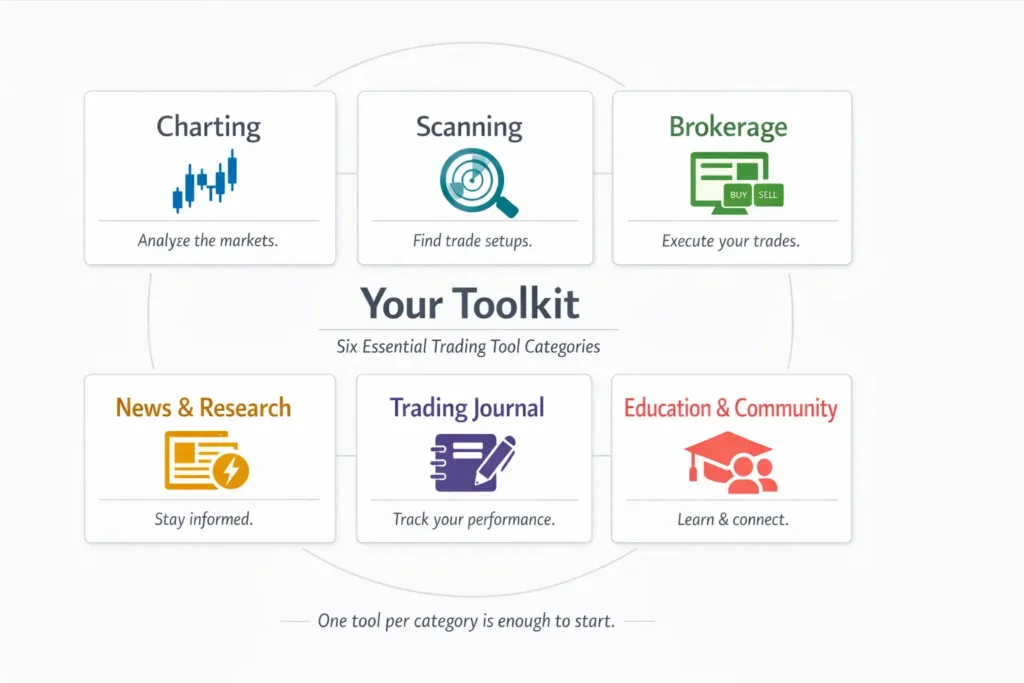
1. Charting Platform
What it does: Displays price charts with candlesticks, indicators, and drawing tools. This is where you analyze price action and identify potential trade setups.
Why it matters: You literally cannot day trade without charts. This is the visual language of the market — every decision you make starts here.
2. Stock Scanner / Screener
What it does: Filters thousands of stocks down to a manageable watchlist based on criteria you define — things like price range, volume, percentage change, float size, or technical patterns.
Why it matters: There are roughly 8,000+ stocks listed on U.S. exchanges. Without a scanner, finding tradeable opportunities each morning is like searching for a specific grain of sand on a beach. We go deep on scanners in our Stock Scanners guide.
3. Brokerage / Execution Platform
What it does: This is where you actually place trades — buy, sell, set stop losses, manage positions. Your broker is the gateway between your decisions and the market.
Why it matters: Execution quality directly impacts your P&L. Slow fills, bad routing, and poor hot key support cost real money on every trade. We cover what to look for in a broker in our Choosing a Broker guide and break down the true costs in our Brokerage Costs guide.
4. News & Research
What it does: Delivers real-time market news, earnings reports, economic data releases, and stock-specific catalysts. Helps you understand why a stock is moving, not just that it’s moving.
Why it matters: In day trading, catalysts drive price action. A stock gapping up 15% pre-market is doing so for a reason — FDA approval, earnings beat, analyst upgrade, sector news. If you don’t know the reason, you’re trading blind.
5. Trading Journal
What it does: Records your trades, including entries, exits, position sizes, P&L, and — critically — your thought process and emotions. Over time, it reveals patterns in your behavior that you’d never notice otherwise.
Why it matters: The trading journal is the most underrated tool in a trader’s arsenal. It’s how you turn random trading into systematic improvement. We cover this in depth in our Trading Journal guide.
6. Education & Community
What it does: Courses, mentors, chat rooms, and trading communities that teach strategies, share ideas, and provide accountability.
Why it matters: Trading is isolating. Having access to experienced traders who’ve already made the mistakes you’re about to make can dramatically shorten your learning curve — if you choose quality over hype.
Those are your six categories. Every trading tool on the market fits into one of these boxes. Now let’s talk about what you actually need to spend in each one.
Free vs. Paid: What You Actually Need in Each Category
This is the core of the article. For each of the six categories, we’ll tell you honestly: is free good enough for a beginner, or is paid worth the investment early on?
Charting: Free Is Genuinely Great for Beginners
Our verdict: Start free. Upgrade later only if you hit specific limitations.
The charting landscape has changed dramatically over the past few years. Free charting platforms in 2026 offer capabilities that would have cost hundreds of dollars per month a decade ago.
Free options that are genuinely good enough:
- TradingView (free tier) offers real-time data on many exchanges, a massive indicator library, community-shared scripts, and clean, intuitive charting. The free plan limits you to a few indicators per chart and one chart layout — but for a beginner learning candlestick patterns and support/resistance, that’s more than sufficient.
- Thinkorswim (now under Schwab) is free with a brokerage account and provides professional-grade charting with hundreds of built-in studies. The learning curve is steep, but the tool is powerful.
- Finviz offers solid daily charts with basic technical overlays. It’s better known for screening, but the charts are a solid starting point.
When to consider paying for charting:
- You need multiple chart layouts saved simultaneously (day job + trading requires quick-switch setups)
- You want real-time data on exchanges where the free tier has delays
- You’re running complex multi-indicator strategies that exceed the free tier’s limits
- You need multi-timeframe analysis across several monitors — which we explain in our Chart Timeframes guide later in the series
Typical paid cost: $15–$30/month for most charting platform upgrades.
Scanning: Start Free, But This Is Where Paid Pays Off Fastest
Our verdict: Free scanners work for learning. Paid scanners become worth it once you have a defined strategy.
This is the one category where the gap between free and paid is most significant — and where paid tools deliver the clearest return on investment once you know what you’re looking for.
Free scanning options:
- Finviz’s free screener is excellent for end-of-day or pre-market scanning based on fundamental and technical criteria. You can filter by market cap, volume, price, sector, and many technical signals.
- Thinkorswim’s Stock Hacker lets you build custom scans with a wide range of criteria — and it’s free with your Schwab account.
- Yahoo Finance and various free stock screener websites offer basic filtering.
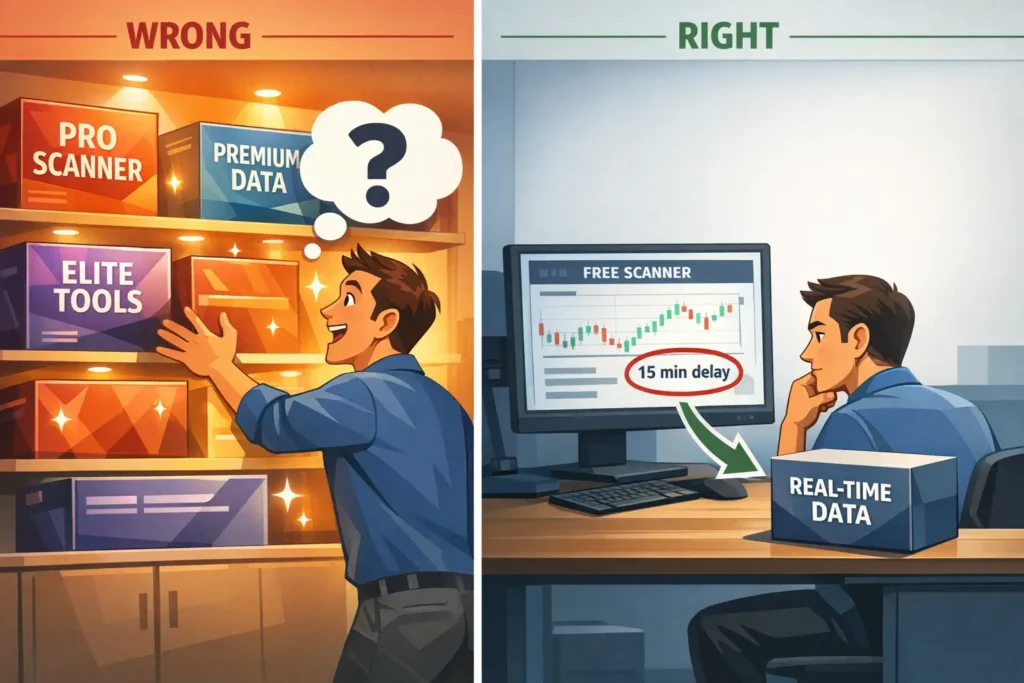
The limitation of free scanners: Most free scanners update on a delay — anywhere from 15 minutes to end-of-day only. For pre-market research and watchlist building, that’s fine. For finding stocks in real time during the trading session, delays matter. A stock can move 5-10% while you’re looking at 15-minute-old data.
When to consider paying for scanning:
- You have a defined trading strategy and know exactly what criteria make a stock worth trading
- You’re consistently finding that free scanner delays cause you to miss opportunities
- You’re ready for real-time alerts that notify you the instant a stock meets your criteria
This is where a platform like Trade Ideas becomes genuinely valuable. It offers real-time scanning with over 500 filters, AI-powered trade signals through its Holly AI system, and custom alert windows that update the instant a stock meets your criteria. But — and this is important — it’s not a beginner’s first tool. It’s a tool for a trader who already understands what they’re scanning for. If you don’t yet know what makes a good setup, a powerful scanner just shows you more noise, faster.
Our recommendation: learn scanning fundamentals with free tools first. When you can articulate “I need a scanner that shows me stocks above VWAP with relative volume over 3x and a price between $5-$50 in real time” — that’s when paid scanning tools justify their cost. Check our Trade Ideas coupon page for the latest savings when you’re ready.
Typical paid cost: $30–$120/month depending on the platform and tier.
Brokerage / Execution: Free-ish, With Important Caveats
Our verdict: Commission-free brokers are fine for learning. DMA brokers with per-share commissions are worth it once you’re trading actively with a defined strategy.
The brokerage category is unique because “free” doesn’t mean what it used to. Commission-free brokers like Schwab, Fidelity, and others don’t charge you per trade, but they make money through payment for order flow — or PFOF — which means they route your orders to market makers who pay for the privilege of filling them. For beginners placing small, infrequent trades, this is perfectly fine. The cost difference is negligible.
For active day traders making dozens of trades per day on volatile, fast-moving stocks, execution quality starts to matter. DMA brokers — like Interactive Brokers, Lightspeed, or CenterPoint Securities — charge commissions but give you direct market access, better fills, and the hot key customization we covered in our Hot Keys guide.
The beginner play: Start with a commission-free broker. Use their paper trading simulator. Learn. When you’re ready for live trading and you’re making enough trades that execution quality measurably impacts your P&L, consider upgrading to a DMA broker.
Typical cost: $0 for commission-free brokers; $0.002–$0.005 per share for DMA brokers (plus potential platform fees of $0–$100+/month).
News & Research: Free Is Sufficient for Most Beginners
Our verdict: Free news sources cover 90% of what a beginner needs. Premium newswires are a later-stage upgrade.
Good free news sources for beginners include Yahoo Finance for general market news and earnings calendars, Finviz for market heat maps and stock-specific news aggregation, SEC’s EDGAR for company filings (if you want to go deep), and X (formerly Twitter) for real-time breaking news — if you curate your feed carefully and avoid the noise.
Most beginning day traders don’t trade news events directly. They trade technical setups where catalysts provide context, not the primary trigger. A free news feed that tells you “XYZ reported earnings beat” is usually sufficient. You don’t need a $100/month squawk box telling you the same thing two seconds faster — not yet.
When to consider paying for news:
- You’re actively trading catalyst-driven strategies (earnings, FDA, economic reports)
- You need real-time audio squawks to get news before it hits text feeds
- You’re trading in a style where seconds of news speed advantage make a measurable difference
Typical paid cost: $40–$150/month for premium news services.
Trading Journal: Free Works — And Is Non-Negotiable
Our verdict: Start with a free spreadsheet. Upgrade to paid journal software when your trade volume justifies automation.
This is the one tool every trader needs that many beginners skip — not because it costs money, but because it requires discipline.
A Google Sheets or Excel spreadsheet is a perfectly good trading journal. Record the date, ticker, entry price, exit price, position size, P&L, and — most importantly — your reasoning and emotional state for each trade. That’s it. You don’t need AI-powered analytics for your first 50 trades. You need honest self-reflection.
When to consider paying for a journal:
- You’re taking 5+ trades per day and manual entry becomes a bottleneck
- You want automated trade importing from your broker
- You’re ready for advanced analytics (win rate by time of day, P&L by setup type, drawdown tracking)
- You want tools like trade replay to review your executions in detail
Paid journal platforms like TraderSync typically range from $30–$50/month and can auto-import trades from most major brokers. They’re excellent once you have enough trade data to analyze. But for your first few months? A spreadsheet does the job, and the act of manually entering trades actually forces you to reflect on each one. We compare journaling tools in our Day Trading Toolkit.
Typical paid cost: $0 for spreadsheets; $30–$50/month for dedicated journal software.
Education & Community: Be Very Selective With Your Money
Our verdict: Some of the best education is free. Some paid communities are genuinely worth it. Most “courses” promising shortcuts are not.
The education and community space is where beginners waste the most money outside of trading losses. The internet is flooded with $500–$2,000 trading courses promising to teach you “the secret” to consistent profits. Most of these courses teach the same concepts you can learn for free from reputable sources like Investopedia, broker-provided education, and quality YouTube channels from legitimate traders.
Genuinely free education that works:
- Broker-provided learning centers (Schwab, Interactive Brokers, Fidelity all have extensive free courses)
- Investopedia’s trading education sections
- Quality YouTube channels from traders who show both wins AND losses
- Our own Beginner’s Guide series — which is why you’re here
When paid education/community is worth it:
- You’ve exhausted free resources and need structured mentorship
- You want a live trading room where you can watch an experienced trader in real time
- You need accountability and community to stay disciplined during the learning phase
The key test: does the education provider focus on risk management and process, or do they focus on profit screenshots and lifestyle? The former is worth considering. The latter is almost always a waste of money.
We review top education platforms and trading communities — including options at various price points — in our Day Trading Toolkit.
Typical paid cost: $0 for free resources; $50–$250/month for quality communities and live trading rooms; $500–$2,000+ for structured courses (one-time).
The Realistic Day Trading Tool Budget (3 Tiers)
Here’s what most articles won’t give you: a concrete monthly cost breakdown across three realistic spending levels. These are estimates — your actual costs will vary based on the specific tools you choose.
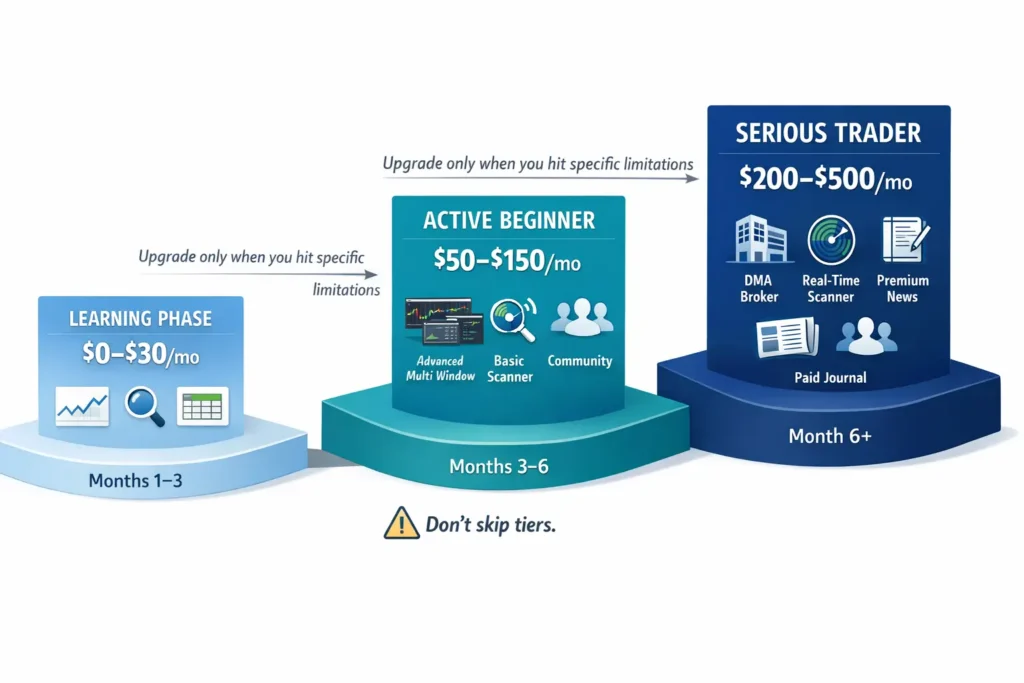
Tier 1: The “Learning Phase” Setup ($0–$30/month)
This is where every beginner should start. You’re in paper trading mode. You’re learning, not earning.
- Charting: TradingView free or Thinkorswim (free with Schwab account)
- Scanning: Finviz free screener + Thinkorswim Stock Hacker
- Brokerage: Commission-free broker (Schwab, Fidelity) — paper trading mode
- News: Yahoo Finance, Finviz news, curated X feed
- Journal: Google Sheets or Excel (free)
- Education: Free broker education, Investopedia, quality YouTube
Estimated monthly cost: $0–$30 (mostly for optional real-time data add-ons if your broker charges for them)
Who this is for: Anyone in their first 1-3 months of learning. You haven’t placed a live trade yet. You’re building foundational knowledge and screen time.
Tier 2: The “Active Beginner” Setup ($50–$150/month)
You’ve paper traded for at least 2-3 months. You have a basic trading plan. You’re placing small live trades or preparing to transition from paper. You know what setups you’re looking for.
- Charting: TradingView Essential or Plus plan ($13–$25/month) for extra layouts and indicators
- Scanning: Free scanners still work, but you might add a basic paid scanner
- Brokerage: Commission-free for small accounts, or beginning to explore DMA brokers
- News: Still free sources, possibly adding a basic premium feed
- Journal: Still spreadsheet, or upgrading to a basic paid journal ($30/month)
- Education: Possibly one quality paid community or live trading room ($50–$100/month)
Estimated monthly cost: $50–$150
Who this is for: Traders in months 3-6 who have foundational knowledge, have paper traded consistently, and are transitioning to small live trades. They know what they need — they’re not guessing.
Tier 3: The “Serious Day Trader” Setup ($200–$500/month)
You’ve been trading actively for 6+ months. You have a defined strategy. You can articulate exactly why you need each tool. Your trading is generating enough P&L — or you’re committed enough to the career — that tool costs are a legitimate business investment.
- Charting: TradingView Premium or a DMA platform’s built-in charting
- Scanning: Professional scanner like Trade Ideas (Standard or Premium)
- Brokerage: DMA broker with per-share pricing + platform fees
- News: Premium newswire for catalyst-driven trading
- Journal: Paid journal software with auto-import and analytics
- Education: Selective — a quality community or mentor, not a stack of courses
Estimated monthly cost: $200–$500
Who this is for: Traders who have proven consistency in paper trading or small live accounts and are scaling up. This is a business investment, not a beginner purchase.
The progression from Tier 1 to Tier 3 should take at minimum 6 months. We’ve seen new traders try to jump straight to Tier 3 on day one. It almost never works. You’re paying for tools you can’t yet leverage — it’s like buying a Formula 1 car for your first driving lesson.
5 Signs You’re Ready to Upgrade from Free to Paid Tools
How do you know when a paid upgrade is justified? Look for these concrete signals:
1. You can articulate exactly what the paid tool does that the free version can’t — and why that matters for YOUR specific trading.
“I need real-time scanning because I trade momentum breakouts and my free scanner’s 15-minute delay causes me to miss entries by 20-30 cents.” That’s a justified upgrade. “I want a paid scanner because it looks more professional” is not.
2. You’ve hit a specific, repeatable limitation in your free tool.
Not a theoretical limitation — an actual one you’ve encountered multiple times. “I’ve missed three setups this week because my free scanner didn’t show me the stock until after the move” is specific. “I feel like I might be missing things” is vague.
3. You have a trading plan and strategy that you’ve paper-traded successfully.
If you don’t yet have a defined strategy, paid tools give you more data, not more edge. Strategy first, tools second. Always.
4. The cost of the tool is less than the value it provides.
If a $100/month scanner helps you find one additional quality setup per week that nets you $200 — that’s a clear positive ROI. If you’re paying $100/month and your total trading P&L is negative, the scanner isn’t the problem.
5. You’ve been trading (paper or live) consistently for at least 2-3 months.
Consistency proves you’re committed, not just curious. Subscribing to premium tools after two days of paper trading is premature. Give yourself time to understand what you actually need.
The Tools You Should Skip Entirely as a Beginner
Not every tool that exists needs to be in your toolkit. Here are the ones our team recommends beginners avoid completely:
Bloomberg Terminal and Institutional-Grade Data Feeds
A Bloomberg Terminal costs approximately $24,000 per year. Reuters Eikon is similarly priced. These are designed for institutional portfolio managers and hedge fund analysts. As a retail day trader — especially a beginner — you’ll get zero additional value from these versus a $25/month TradingView plan. Don’t even think about it.
Trading Bots and Automated Systems
Automated trading systems, algorithm builders, and “set it and forget it” bots are not beginner tools. They require deep understanding of market mechanics, risk management, and programming logic to use safely. A bot that blindly executes a strategy you don’t fully understand is a guaranteed way to lose money faster than you can figure out what went wrong. Learn to trade manually first. Automation is a much later conversation.
Multiple Overlapping Tools in the Same Category
You do not need three charting platforms. You do not need two stock scanners running simultaneously. You do not need a premium news service AND a premium news aggregator AND a social media sentiment tool. Pick one tool per category. Master it. If it has a genuine limitation, then consider adding a second.
“Signal” Services and Discord Alert Channels
Services that send you “buy X stock at Y price” alerts are not educational tools — they’re dependency traps. You learn nothing from following someone else’s signals. When the alerts stop (or the service shuts down), you’re left with no skill, no strategy, and no ability to find your own trades. Build your own analytical skills instead.
Expensive One-Time Courses (Before Exhausting Free Resources)
If someone is charging $1,000+ for a trading course, and you haven’t yet gone through your broker’s free education library, Investopedia’s free tutorials, or the free resources available from legitimate trading educators — you’re paying for convenience, not knowledge. Exhaust the free tier first. Then evaluate paid education with an informed perspective.
How to Build Your Starter Toolkit (A Step-by-Step Plan)
Here’s the exact sequence we recommend for building your trading toolkit from zero.
Month 1: Foundation Only
Open a brokerage account with a major commission-free broker. Use their built-in charting and paper trading simulator. Sign up for TradingView’s free tier as a supplementary charting tool. Bookmark Finviz for screening and market heat maps. Set up a Google Sheets trading journal — even in paper trading, log every trade.
Focus: Learning to read charts, understanding order types, and getting screen time. Do NOT subscribe to anything paid. Total cost: $0.
Month 2-3: Add Free Scanning and News
Start building daily watchlists using Finviz’s free screener and your broker’s built-in scanner. Follow a few curated financial news accounts on X. Practice identifying catalysts — earnings, FDA news, sector rotation — using free sources.
Focus: Building a pre-market routine and learning what makes a stock tradeable. Still paper trading. Still $0 in tool costs.
Month 3-4: Evaluate and Upgrade Selectively
By now, you should have a basic trading plan and at least 50-100 paper trades logged in your journal. Ask yourself: Where am I hitting walls? Is it charting limitations? Scanner speed? Lack of community and accountability?
Upgrade one tool at a time based on a specific identified need. Maybe it’s a TradingView paid plan for extra chart layouts. Maybe it’s a basic paid community for accountability. Maybe it’s nothing — if free tools are still serving you, keep using them.
Focus: Targeted upgrades based on specific limitations, not general “I should probably pay for something” thinking.
Month 6+: Scale With Your Strategy
As your strategy solidifies and you transition to live trading (or small live trades), add the tools that directly support your workflow. This might mean a real-time scanner, a DMA broker for better execution, or a paid journal for automated analytics.
The key: every paid tool should trace back to a specific problem it solves in your trading process. If you can’t name the problem, you don’t need the tool.
For our complete, curated list of the best tools across every category — including the ones our team uses daily — visit our Day Trading Toolkit. We’ve organized everything by category, quality, and price point so you can make informed decisions at every stage of your journey.
What’s Next in Your Day Trading Journey
You’ve now completed Module 2 — your entire trading cockpit is built. You’ve chosen your hardware and software, selected a broker, set up your screen layout, configured your hot keys, and now you know exactly which tools to invest in and which to skip.
It’s time to actually learn to read the market. Module 3 opens with the visual language that every day trader must master: candlestick charts. How to read them, what they’re telling you, and why price action is the one skill that never becomes obsolete — regardless of what tools you use.
→ Next Article: Reading the Story of Price: An Introduction to Candlestick Charts
Frequently Asked Questions
Can you day trade with only free tools?
Quick Answer: Yes — free tools in 2026 are capable enough to learn the fundamentals, paper trade, and even begin live trading with small positions.
The free tiers of platforms like TradingView, Thinkorswim, and Finviz offer charting, scanning, and analysis capabilities that would have been premium-only just a few years ago. Combined with a commission-free broker’s paper trading simulator and a Google Sheets journal, you have everything you need to learn the mechanics of day trading without spending a dollar on subscriptions. The limitation comes when you need real-time scanning speed, multi-monitor chart layouts, and automated journal analytics — but those needs don’t typically arise until you’ve been trading for several months and have a defined strategy.
Key Takeaway: Free tools are more than sufficient for the learning phase — don’t pay for upgrades until you can identify a specific limitation the paid version solves.
How much should a beginner spend on trading tools per month?
Quick Answer: Most beginners should spend $0–$30/month on tools during their first 3 months, scaling to $50–$150 only after they have a defined strategy and consistent paper trading history.
The biggest money mistake beginners make is oversubscribing to tools before they have the skills to use them. A new trader paying $300/month for professional-grade tools is like a first-year medical student buying surgical instruments — technically excellent equipment, completely useless without years of training. Start at Tier 1 ($0–$30), progress to Tier 2 ($50–$150) only after at least 2-3 months of consistent practice, and consider Tier 3 ($200–$500) only when trading is generating enough P&L or you’re fully committed to the career.
Key Takeaway: Spend $0 in your first month. Your capital is better invested in learning than in subscriptions.
What’s the most important paid tool to upgrade to first?
Quick Answer: For most day traders, a real-time stock scanner is the first paid upgrade that delivers a clear return on investment — but only after you know what you’re scanning for.
Charting, news, and journaling all have strong free alternatives that can serve you for months. Scanning is where the free-to-paid gap is largest. Free scanners typically run on delayed data (15-minute or end-of-day), which is fine for building watchlists the night before but inadequate for finding opportunities in real time during the trading session. Once you have a defined strategy and can articulate specific scanner criteria — like relative volume thresholds, price ranges, and technical conditions — a real-time scanner becomes the first tool where paying delivers measurable improvement. We compare the top scanning options in our Day Trading Toolkit.
Key Takeaway: A real-time scanner is typically the first worthwhile paid upgrade — but only after you’ve developed a strategy that tells you what to scan for.
Is TradingView’s free plan good enough for day trading?
Quick Answer: Yes, for learning and early-stage trading. The free plan provides real-time data on many exchanges, solid charting tools, and a massive community — though it limits you on chart layouts and simultaneous indicators.
TradingView’s free tier gives you access to one chart layout, a limited number of indicators per chart, and basic alerting. For a beginner learning candlestick patterns, support/resistance levels, and basic indicator reading, this is more than sufficient. The main limitations you’ll hit as you progress are the inability to save multiple chart layouts (which matters when you start monitoring multiple stocks simultaneously) and restrictions on the number of alerts. Most traders find the Essential or Plus plan ($13–$25/month) is the sweet spot when they’re ready to upgrade — it unlocks enough functionality for active day trading without the premium price tag.
Key Takeaway: Start free, upgrade to Essential or Plus when you need multiple chart layouts — typically after your first few months of active practice.
Are free stock scanners good enough for day trading?
Quick Answer: Free scanners are good enough for pre-market watchlist building and learning how to screen. They’re not sufficient for real-time intraday scanning once you’re actively trading.
Finviz’s free screener, Thinkorswim’s Stock Hacker, and Yahoo Finance’s screener all let you filter stocks by fundamental and technical criteria. For building a daily watchlist before the market opens — which is how most beginners should use scanners initially — these work well. The gap emerges when you need stocks surfacing in real time during the session: a low-float stock suddenly spiking on 10x volume, for instance. Free scanners won’t catch that fast enough. That’s where paid options become worthwhile, but again — not until you’re trading live and have a strategy that requires real-time stock discovery.
Key Takeaway: Use free scanners for learning and pre-market prep. Upgrade to real-time scanning only when you’re actively trading live and have criteria that demand speed.
Should I pay for a trading course?
Quick Answer: Not until you’ve exhausted the extensive free resources available through your broker, Investopedia, and quality YouTube channels — and even then, be very selective.
The day trading education space is flooded with overpriced courses that teach the same concepts available for free. Before spending $500+ on a course, ask: Have I completed my broker’s free education library? Have I read through Investopedia’s trading sections? Have I watched quality free content from educators who show real trades — including losses? If you’ve done all that and still feel you need structured mentorship, look for courses that emphasize risk management and process development over profit screenshots and lifestyle marketing. The red flags are guarantees of profitability, emphasis on fast results, and a focus on showing luxury items rather than actual trading education.
Key Takeaway: Exhaust free resources first. When evaluating paid education, prioritize risk management focus and transparent track records over marketing hype.
Do I need a paid trading journal?
Quick Answer: Not initially. A Google Sheets or Excel spreadsheet is a perfectly good journal for your first 50-100 trades. Paid journals become worthwhile when your trade volume makes manual entry impractical.
The purpose of a trading journal is self-reflection and pattern recognition — and a simple spreadsheet accomplishes both. Record the date, ticker, entry/exit, size, P&L, the reason for the trade, and how you felt emotionally. That’s the core of journaling. Paid journal software like TraderSync adds value through automated trade importing, detailed analytics, trade replay, and AI-powered pattern detection — but these features matter most when you have hundreds of trades to analyze. For your first months, the act of manually typing each trade into a spreadsheet actually forces a level of review that auto-import skips over.
Key Takeaway: Start with a free spreadsheet. The manual entry process is part of the learning. Upgrade to paid journal software when trade volume makes manual entry a burden.
What trading tools do professional day traders use?
Quick Answer: Most professional day traders use a DMA broker, a real-time scanner, professional-grade charting, a premium news feed, and a dedicated trading journal — typically spending $200–$500/month on tools.
A realistic professional setup might include: a DMA broker like Interactive Brokers or Lightspeed ($50–$150/month in platform and data fees), a real-time scanner like Trade Ideas ($75–$180/month), TradingView Premium or platform-integrated charting ($25–$60/month), a premium news service like Benzinga Pro ($40–$100/month), and a paid journal ($30–$50/month). That total ranges from $200–$500/month depending on exact choices. But here’s the thing — professional traders built up to this level over months or years. They didn’t start by subscribing to everything at once. Each tool was added when they identified a specific need their existing setup couldn’t meet.
Key Takeaway: Professionals spend $200–$500/month on tools — but they got there gradually, adding each tool based on a specific identified need, not all at once.
Is it worth paying for real-time market data?
Quick Answer: Yes, once you’re actively day trading — even in paper trading. Real-time data is essential for accurate practice. Delayed data creates unrealistic execution expectations.
Most commission-free brokers provide basic real-time Level 1 data (bid, ask, last price) for free. Some charge $1–$10/month for real-time data from specific exchanges. If you’re day trading or paper trading during market hours, real-time data is the one “paid” add-on worth getting immediately. Practicing with 15-minute delayed data teaches you the wrong timing, creates unrealistic fill expectations, and builds bad habits. If your broker offers real-time data for free (many do for accounts above certain thresholds), you’re already covered. If they charge a small monthly fee, it’s one of the first justified expenses.
Key Takeaway: Real-time data is the one upgrade worth paying for immediately — delayed data creates bad habits during practice.
How do I avoid wasting money on unnecessary trading tools?
Quick Answer: Follow the “problem first, tool second” rule — never subscribe to a tool unless you can name the specific problem it solves in your current trading workflow.
Before subscribing to any paid tool, write down the exact problem you’re trying to solve. “My free scanner doesn’t update in real time, and I’ve missed 5 setups this week because of the delay” is a valid reason to pay for a scanner. “I feel like I should have better tools” is not. Also: cancel any free trial before it auto-converts to paid — set a calendar reminder on the day you sign up. Review your active subscriptions monthly and cancel anything you haven’t used in the past 30 days. And never stack multiple tools in the same category — you don’t need three charting platforms or two news services.
Key Takeaway: Name the problem before buying the tool. If you can’t articulate the specific limitation your current setup has, you don’t need an upgrade yet.
Disclaimer
The information provided in this article is for educational purposes only and should not be considered financial advice. Day trading involves substantial risk and is not suitable for every investor. Past performance is not indicative of future results.
For our complete disclaimer, please visit: https://daytradingtoolkit.com/disclaimer/
Article Sources
Our team referenced the following authoritative sources to build this guide on trading tool costs and beginner spending decisions. These resources provide additional depth on platform comparisons, fee structures, and the realistic costs of day trading.
- Investopedia: Best Day Trading Platforms — Comprehensive comparison of day trading platforms including costs, features, and suitability for different trader levels
- SEC: Investor Bulletin — How Fees and Expenses Affect Your Investment Portfolio — SEC investor education on understanding the impact of fees and expenses on investment returns
- FINRA: Understanding Investment Professional Fees and Expenses — FINRA’s guide helping investors understand and evaluate the fees associated with investment services


