


Stop searching for the “one perfect AI tool” for day trading. It doesn’t exist.
We’ve spent the better part of two years testing every AI-powered trading platform, chatbot, and scanner that’s landed on our radar. And here’s the uncomfortable truth that no affiliate-driven listicle wants to tell you: the traders getting real value from AI in 2026 aren’t using one tool. They’re using a stack—a small, intentional combination of specialized tools that each handle a different part of the trading workflow.
The best AI tools for day traders aren’t a ranked list. They’re a system. And the system you build depends entirely on what job you need AI to do.
That’s the framework we’re giving you here. Not another “Top 10 AI Trading Bots” article where everything gets four and a half stars. Instead, we’re breaking AI tools into the four jobs that actually matter to a day trader—Discovery, Analysis, Chart Recognition, and Review—and recommending the best tool for each job. We’re also going to be brutally honest about which tools are genuinely AI-powered and which ones are just riding the hype wave with a chatbot bolted onto a basic screener.
The AI trading platform market is projected to grow from roughly $13.5 billion in 2025 to nearly $70 billion by 2034, according to Precedence Research. That kind of money attracts serious innovation—and serious marketing spin. Our job is to help you tell the difference.

How We Evaluate AI Trading Tools (The 4-Level Framework)
Before we recommend anything, you need a filter. Not all “AI” is created equal, and the gap between what’s marketed as artificial intelligence and what’s actually using machine learning is enormous.
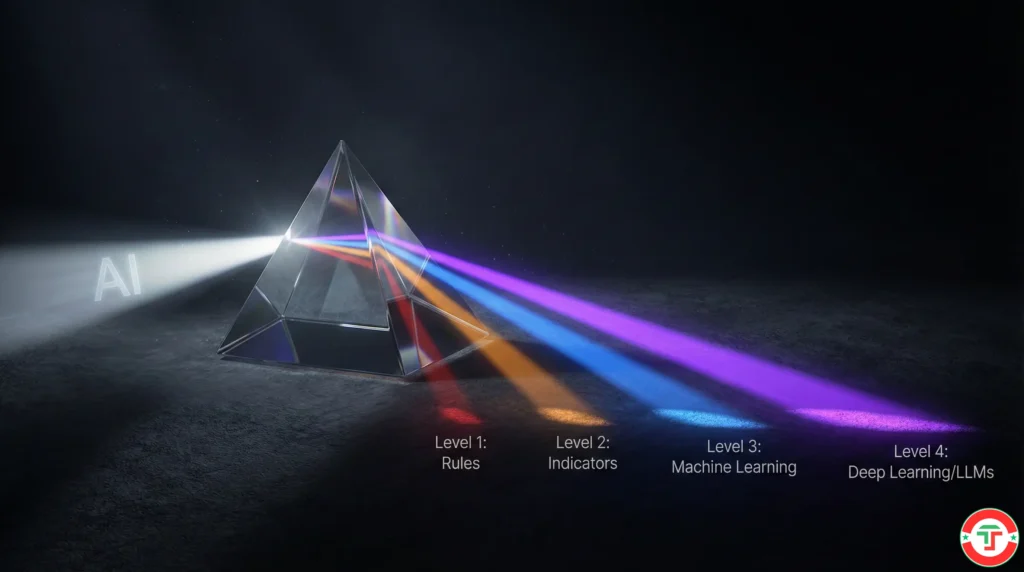
We introduced our 4-Level AI Framework in our deep dive on AI trading bots: truth vs. hype, and we apply it to every tool in this article. Here’s a quick refresher:
Level 1 — Rules-Based: Pre-programmed if/then logic. “If RSI crosses above 70, alert me.” This isn’t AI. It’s automation. Most tools marketed as “AI trading bots” live here.
Level 2 — Indicator-Based Intelligence: Combines multiple indicators with weighted scoring. Smarter than raw rules, but still static. The parameters don’t change unless a human changes them.
Level 3 — Machine Learning: The tool actually learns from data. It adjusts its own parameters, identifies patterns across historical datasets, and optimizes strategies through backtesting. Trade Ideas Holly and TrendSpider’s AI Strategy Lab operate here. This is where “AI” starts meaning something real.
Level 4 — Advanced AI (LLMs / Deep Learning): Neural networks, natural language processing, sentiment analysis at scale. ChatGPT, Claude, and Gemini live here—though their application to real-time trading has significant limitations we’ll address.
When you see a tool in this article, we’ll tell you which level it actually operates at. No guessing, no marketing language. Just what’s under the hood.
Best AI for Trade Discovery: Scanning and Signal Generation
This is the job most day traders think of first—finding the trade. Scanning thousands of stocks in real time to surface the ones that match your criteria, right now, with actionable entry and exit levels.
This is also the category where the gap between “real AI” and “rules with a fancy interface” is widest.
Trade Ideas Holly AI — The Gold Standard
AI Level: 3 (Machine Learning) Best For: Active day traders executing multiple trades daily Pricing: Standard (Birdie) at $127/month or $89/month annually | Premium (Eagle Elite) at $254/month or $178/month annually
Here’s the deal. We’ve used Trade Ideas for years. We’ve written a comprehensive Trade Ideas review and a deep dive into how Holly AI actually works. So we’re not going to pretend this is news to us.
But in the context of “best AI tools,” Holly remains in a category of one for retail day traders. Why? Because it does something almost no other retail tool does—it runs genuine machine learning simulations every single night, backtesting dozens of strategies across the entire U.S. stock market, then surfaces only the strategies that showed statistical edge for the next trading session.
Holly doesn’t just scan for stocks meeting criteria. She evaluates which strategies are working in the current market regime and applies them the next morning. That’s the difference between Level 1 automation and Level 3 machine learning.
Three Holly systems operate simultaneously. The original Holly focuses on risk-managed day trades with defined entries, stops, and targets. Holly 2.0 takes on higher-risk, higher-reward setups. And Holly Neo spots real-time chart patterns—pullbacks, breakouts, reversals—as they form during the trading session.
The catch? Holly’s real AI features live behind the Premium tier at $254/month. The Standard plan gives you excellent scanning—over 500 filters, real-time alerts, paper trading—but no AI signals. For day traders executing ten or more trades per week with accounts above the $25,000 PDT threshold, the Premium plan typically justifies itself. For everyone else, start with the Standard plan and see our Trade Ideas pricing and discount guide before committing.
Check current pricing and plans for Trade Ideas here.

TrendSpider Scanner — AI-Enhanced Technical Screening
AI Level: 2-3 (Indicator-Based with ML Features) Best For: Technical traders who want automated pattern detection in their scans
TrendSpider’s scanning engine combines traditional technical screening with its AI-powered pattern recognition. You can scan for stocks forming specific chart patterns, hitting automated trendlines, or triggering candlestick formations—all identified by the platform’s algorithms rather than manually drawn by you.
Where TrendSpider earns its “Level 3” qualifier is in the AI Strategy Lab (more on that in the Chart Analysis section). But for pure scanning and discovery, it operates closer to Level 2—highly sophisticated indicator-based screening with automated visual pattern detection layered on top.
We’ve published a full TrendSpider review covering the complete platform. For discovery specifically, it’s strongest when you’re looking for chart-pattern-driven setups rather than the statistical edge approach Holly takes.
Explore TrendSpider’s current plans.
What About Tickeron, StockHero, and Others?
We tested several other platforms marketing AI-powered discovery. Most fall into Level 1-2 territory once you look past the branding. Tickeron offers interesting pattern-recognition predictions with confidence scores, but the underlying methodology is closer to statistical pattern matching than true machine learning. StockHero focuses on bot execution rather than discovery—it’s more relevant to our no-code trading bot guide in the automation cluster.
Our take: for AI-powered trade discovery, Trade Ideas Holly remains the clear leader for retail day traders. Nothing else combines nightly ML optimization with real-time signal delivery at this level.
Best AI for Market Analysis and Research
Here’s where things have changed dramatically in the last year. The rise of Large Language Models—ChatGPT, Claude, Gemini—has created an entirely new category of AI tool for traders. Not scanning. Not execution. Research and analysis.
These tools operate at Level 4 (Advanced AI/LLMs), and they’re arguably the most accessible AI tools available to any trader, often for free.

ChatGPT — The Versatile Research Assistant
AI Level: 4 (LLM) Best For: Strategy brainstorming, code generation (Pine Script, Python), earnings report summaries, concept learning Pricing: Free tier available | Plus at $20/month | Pro at $200/month
ChatGPT remains the most widely used LLM for trading tasks, and for good reason. It’s the best all-rounder—strong at coding, decent at analysis, excellent at explaining concepts in plain English.
We covered seven specific use cases in our ChatGPT day trading guide, and we’ve published a library of tested ChatGPT prompts for traders. Rather than duplicate that here, let’s focus on what makes ChatGPT the right choice vs. the alternatives.
ChatGPT’s edge is versatility. Need to debug a Pine Script indicator? ChatGPT handles it. Want to brainstorm three variations of a pullback strategy for different market regimes? It generates solid starting points. Need a 10-K filing summarized with the key risk factors pulled out? It delivers.
The critical limitation hasn’t changed: ChatGPT does not have real-time market data access in its native interface. It can’t tell you what AAPL is trading at right now. It can’t scan for stocks meeting criteria this morning. Treat it as a research analyst who’s brilliant but working from yesterday’s newspaper. With the web search feature enabled in paid tiers, this limitation shrinks—but it’s still not a substitute for a real-time scanner.
Claude — The Deep Thinker for Risk Analysis
AI Level: 4 (LLM) Best For: Complex risk scenario analysis, long document processing, nuanced reasoning Pricing: Free tier available | Pro at $20/month
Claude has become our team’s go-to for tasks that require careful, nuanced reasoning—especially risk analysis and scenario planning. When we need to think through “what happens to my portfolio if the Fed surprises hawkish and the VIX spikes above 30 simultaneously,” Claude tends to produce more thoughtful, multi-layered analysis than the alternatives.
Claude’s standout advantage is its massive context window. You can feed it an entire trading journal, a full earnings transcript, or months of trade data and ask it to find patterns. For journal analysis specifically—finding your behavioral patterns, identifying which setups you execute best, spotting emotional triggers—Claude excels.
We compared all three major LLMs head-to-head for trading tasks in our ChatGPT vs. Gemini vs. Claude comparison. The short version: Claude wins on reasoning depth, ChatGPT wins on versatility and coding, Gemini wins on speed and real-time data integration.
Gemini — Google’s Speed Advantage
AI Level: 4 (LLM) Best For: Quick market overviews, real-time search integration, rapid fact-checking Pricing: Free tier available | Advanced at $19.99/month
Gemini’s killer feature is its native integration with Google Search. Ask it about current market conditions, recent earnings results, or breaking financial news, and it pulls live information without the knowledge-cutoff issues that sometimes trip up other LLMs.
For traders who need fast, current-information research—”What did the Fed say yesterday?”, “What’s the consensus earnings estimate for NVDA?”—Gemini is the fastest path to an answer with sources attached.
Its weakness relative to ChatGPT and Claude is in deeper analytical tasks. Multi-step strategy analysis, complex code generation, and nuanced risk scenarios tend to produce thinner results.
TrendSpider Sidekick — The Embedded AI Analyst
AI Level: 4 (LLM-based, integrated with market data) Best For: Traders who want AI analysis inside their charting platform Pricing: Included with TrendSpider subscription
This is worth highlighting separately because Sidekick solves the biggest LLM limitation we just described—it has access to real market data, charts, and the full TrendSpider analytics engine. You can ask Sidekick to analyze a specific chart, summarize unusual options activity, suggest improvements to a backtest, or even write custom indicators.
Think of it as having Claude or ChatGPT embedded directly inside your trading platform, but with the ability to actually see what’s on your screen and pull live data. That combination of LLM reasoning plus real-time market data is something standalone chatbots simply can’t match.
The trade-off is that Sidekick is locked inside the TrendSpider ecosystem. You’re not using it for general research—you’re using it for TrendSpider-specific analysis and workflow acceleration.
Best AI for Chart Analysis and Pattern Recognition
This category is about using AI to do what your eyes and brain do when you look at a chart—but faster, more consistently, and across hundreds of instruments simultaneously.
TrendSpider AI Strategy Lab — Train Your Own ML Models
AI Level: 3 (Machine Learning) Best For: Technical traders who want to build and test custom AI models without coding
This is, in our opinion, the single most underrated AI feature in retail trading software right now.
The AI Strategy Lab lets you train custom machine learning models—Random Forest, K-Nearest Neighbors, Naive Bayes, Logistic Regression—using any combination of market data, indicators, and timeframes you choose. You define the outcome you want (say, a 5% price increase within 10 days), set your risk parameters, pick your training data, and click “Train.” No coding. No data science degree.
Once trained, your model can be deployed as a signal on charts, incorporated into backtests, used as scanner criteria, or even drive automated trading bots. As Traders Magazine reported when the feature launched, the AI Strategy Lab puts “the same advanced machine learning capabilities that were previously only accessible to large institutions” into a point-and-click interface.
Is it perfect? No. Training ML models on financial data is notoriously prone to overfitting—the model learns the past beautifully but fails on new data. Our article on AI trading risks covers this danger in detail. But for traders willing to learn the basics of model validation and walk-forward testing, it’s a genuine competitive edge.

TradingView — AI-Adjacent Analysis for the Masses
AI Level: 1-2 (Rules-Based with community-driven enhancements) Best For: Charting, community scripts, Pine Script development (especially when combined with LLMs) Pricing: Free tier available | Plans from $12.95/month
Let’s be direct: TradingView itself isn’t an “AI tool” in the way Trade Ideas or TrendSpider are. Its pattern detection is algorithm-based (Level 1-2), not machine learning. Its strength is being the world’s most popular charting platform with a massive library of community-built indicators and scripts.
Where TradingView becomes an AI story is in combination with LLMs. ChatGPT and Claude are remarkably good at writing Pine Script code. Describe the indicator you want in plain English, and you’ll get functional Pine Script back in seconds. This workflow—”describe to AI, paste into TradingView, backtest, refine”—is how many traders are practically integrating AI into their analysis right now. We cover this in our TradingView review.
Check TradingView plans here.
Best AI for Trade Review and Journaling
This is the category most traders overlook—and arguably where AI delivers the most long-term value. Reviewing your own trades, finding behavioral patterns, and identifying what’s actually working vs. what feels like it’s working.

LLM-Powered Journal Analysis (ChatGPT or Claude)
AI Level: 4 (LLM) Best For: Pattern discovery, behavioral analysis, emotional trigger identification Pricing: Free to $20/month
Export your trading journal to a spreadsheet—dates, tickers, entry/exit prices, P&L, notes on your mental state—and feed it to Claude or ChatGPT. Ask it to find patterns. The results can be genuinely eye-opening.
Common insights traders discover this way: “You lose money 73% of the time when you trade in the first 5 minutes after open,” or “Your win rate on pullback setups is 64% but drops to 31% on breakouts—you might want to stop trading breakouts.”
Claude’s large context window makes it particularly strong here because you can feed in months of journal data in one shot. We’ve written a dedicated guide on using AI to analyze your trading journal with specific prompts and workflow steps.
TraderSync — Dedicated Journal with Analytics
AI Level: 1-2 (Rules-Based Analytics) Best For: Traders who want a structured, purpose-built journaling platform
TraderSync isn’t an AI tool in the machine learning sense. It’s a dedicated trading journal with robust analytics—win rate by setup, by time of day, by day of week, by market condition. The value is in the structure it imposes on your record-keeping and the automated performance metrics it generates.
Our team uses it alongside LLM analysis. TraderSync captures and organizes the data. Then we periodically export that data and run it through Claude for deeper behavioral pattern recognition that TraderSync’s built-in analytics can’t surface—like connections between emotional state notes and trade outcomes.
The Complete AI Trading Stack: Free to Pro
Here’s the practical takeaway. Instead of asking “What’s the best AI tool?”, ask “What stack fits my experience and budget?”
The Free Stack (Getting Started): Use ChatGPT or Claude (free tiers) for research, strategy brainstorming, and journal analysis. Pair with TradingView (free tier) for charting. Use the LLM to help write Pine Script indicators. Total cost: $0.
The Intermediate Stack ($20-40/month): Upgrade to ChatGPT Plus or Claude Pro for faster, more capable analysis. Keep TradingView for charting. Start a structured journal with TraderSync. You’re now using AI for research, code generation, and performance review. Total cost: $20-40/month.
The Pro Stack ($200-450/month): Trade Ideas Premium ($178/month annually) for Holly AI discovery and scanning. TrendSpider ($30-70/month depending on plan) for AI Strategy Lab, Sidekick, and automated charting. ChatGPT Plus or Claude Pro ($20/month) for general research. Total cost: $228-268/month.
Which stack should you choose? If you’re making fewer than three trades per week, start with the Free Stack. We can’t say this strongly enough—spending $250/month on AI tools when you’re still learning the basics is a fast way to add costs without adding edge. Our free AI tools guide covers exactly what’s available at zero cost.
If you’re an active pattern day trader with an account above $25,000, the Pro Stack genuinely pays for itself—if you use it systematically. The key phrase there is “if you use it.” A subscription doesn’t create discipline. As we’ve covered in our article on why AI won’t make you a better trader without the right foundation, tools amplify whatever habits you already have.

What We’d Skip: Overhyped Tools That Aren’t Worth It
We promised honesty, so here it is. There are entire categories of “AI trading tools” we’d steer you away from:
“Set and forget” AI trading bots that promise passive income. If a tool claims you can deposit money, turn on the AI, and watch profits roll in, run. That’s not a tool—it’s a marketing pitch. We’ve cataloged the biggest red flags in our AI trading scams guide.
AI tools that won’t explain their methodology. If you can’t understand—at least at a high level—how the AI generates its signals, you can’t evaluate whether those signals are relevant to your strategy. Transparency isn’t optional.
Standalone AI “prediction” services that claim to forecast where a stock will be tomorrow. Predicting short-term price direction is a problem that the world’s best-funded hedge funds struggle with daily. A $49/month subscription isn’t solving it.
Generic “AI trading” apps that slap a chatbot on top of basic brokerage features and call it artificial intelligence. Check the 4-Level Framework. If the “AI” is just answering your questions about what a moving average is, that’s a chatbot, not a trading tool.
Fair warning: this market is only getting more crowded. As the AI trading platform market expands toward that projected $70 billion by 2034, according to Grand View Research, expect even more products competing for your attention with “AI-powered” in the tagline. Your best defense is the framework we’ve given you—ask what level of AI it actually uses, demand transparency on methodology, and never pay for a tool before you’ve outgrown the free alternatives.

Frequently Asked Questions
What is the best AI tool for day trading in 2026?
Quick Answer: There’s no single “best” tool—the best approach is building a stack of specialized AI tools matched to different trading tasks.
For trade discovery and scanning, Trade Ideas with Holly AI leads the market with genuine machine learning that adapts nightly. For research and analysis, ChatGPT and Claude are the most accessible and powerful options. For chart pattern recognition and custom ML models, TrendSpider’s AI Strategy Lab is unmatched in the retail space. The right combination depends on your trading style, experience level, and budget.
Key Takeaway: Start with free LLM tools (ChatGPT, Claude) and only add paid platforms after you’ve built consistent trading habits. For the full progression, see our free AI tools guide.
Is Trade Ideas Holly AI worth the cost?
Quick Answer: For active day traders making 10+ trades per week with accounts above $25,000, yes—Holly’s machine learning signals provide genuine statistical edge that justifies the $178-254/month cost.
Holly runs nightly backtests across the entire U.S. stock market, surfacing only strategies that showed positive expectancy in current market conditions. That’s something you simply can’t replicate manually. The Standard plan at $127/month gives you elite scanning without AI signals, which is a solid starting point. But the real AI value lives in the Premium tier.
Key Takeaway: Don’t pay for Holly AI until you’re consistently profitable with a clear trading plan. Our in-depth Trade Ideas review breaks down exactly who should and shouldn’t subscribe.
Can ChatGPT actually help with day trading?
Quick Answer: Yes, but not for real-time trade signals or price predictions. ChatGPT excels at research, strategy brainstorming, code debugging (Pine Script, Python), journal analysis, and learning complex concepts quickly.
The critical limitation is that ChatGPT doesn’t access live market data natively. It can’t scan for stocks, execute trades, or tell you what’s moving right now. It’s a research analyst, not a scanner. Treat it that way and it’s incredibly valuable. Expect it to find your next trade in real-time and you’ll be disappointed.
Key Takeaway: We’ve published seven tested use cases with prompts in our ChatGPT day trading guide.
Which AI is better for trading—ChatGPT, Claude, or Gemini?
Quick Answer: Each wins at different tasks. ChatGPT is the best all-rounder (especially for coding). Claude excels at deep risk analysis and processing large datasets. Gemini is fastest for real-time information retrieval.
The smartest approach isn’t choosing one—it’s knowing when to use each. We’ve tested all three on identical trading tasks and published the complete results in our ChatGPT vs. Gemini vs. Claude comparison.
Key Takeaway: Start with whichever free tier you’re most comfortable with, then let the specific task guide your choice as you learn each tool’s strengths.
Are AI trading bots a scam?
Quick Answer: Some are legitimate tools (like Trade Ideas Holly). Many are over-hyped or outright fraudulent. The key is applying a critical framework to evaluate claims.
The majority of tools marketed as “AI trading bots” operate at Level 1-2 of our framework—rules-based automation with AI branding. That doesn’t make them scams, but it does make them less sophisticated than they claim. Real red flags include guaranteed return promises, “set and forget” language, and zero transparency about methodology.
Key Takeaway: Use our 4-Level Framework to evaluate any AI tool claim. For detailed warning signs, read our AI trading bots: truth vs. hype analysis.
How much should I spend on AI trading tools?
Quick Answer: Start at $0 and increase spending only when your free tools become a genuine bottleneck to your profitability.
ChatGPT Free, Claude Free, and TradingView Free give you a legitimate AI-enhanced workflow at zero cost. The first paid upgrade should be a ChatGPT or Claude subscription at $20/month if you’re using it daily. Professional scanning tools like Trade Ideas ($127-254/month) and TrendSpider ($30-70/month) make sense only when you’re actively trading with real capital and need the speed and coverage.
Key Takeaway: Tool spending should never exceed what you can justify through improved trading performance. If a tool isn’t clearly making you better, cut it.
Can AI replace a human day trader?
Quick Answer: No. AI can enhance every part of the trading process—scanning, analysis, risk management, review—but it cannot replace the judgment, discipline, and emotional regulation that separate profitable traders from unprofitable ones.
The best way to think about it: AI is a co-pilot, not a pilot. Holly AI can surface high-probability setups, but you still decide whether to take the trade. ChatGPT can analyze your journal, but you still have to change the behavior it flags. The traders who get the most from AI are the ones who already have a solid foundation of trading fundamentals and risk management.
Key Takeaway: Build your skills first, then add tools. AI amplifies what you already have—good habits become better, bad habits become faster. For more on this, see our piece on why AI won’t make you a better trader without the right groundwork.
What are the biggest risks of using AI for day trading?
Quick Answer: The seven major risks are overconfidence in AI predictions, overfitting in ML models, black-box decision making, data quality issues, systemic flash crash risk, LLM hallucinations, and hidden cumulative costs.
AI tools sound authoritative even when they’re wrong—and that’s dangerous when real money is on the line. ChatGPT can confidently cite statistics that don’t exist. ML models can backtest perfectly but fail live because they’ve memorized the past rather than learned genuine patterns. The SEC and FINRA have both flagged concerns about increasing AI-driven market volatility.
Key Takeaway: Never trade blindly on an AI signal. Always verify, always apply your own risk management, and always understand why a tool is making a recommendation. Our full breakdown covers all seven AI trading risks in detail.
Disclaimer
The information provided in this article is for educational purposes only and should not be considered financial advice. Day trading involves substantial risk and is not suitable for every investor. Past performance is not indicative of future results. AI tools can assist with analysis but cannot guarantee profits. Never trade with money you can’t afford to lose.
For our complete disclaimer, please visit: https://daytradingtoolkit.com/disclaimer/
Article Sources
Our team relies on primary research, hands-on testing, and authoritative third-party data to ensure every recommendation in this article is accurate and trustworthy. The following sources informed our analysis:
- Grand View Research — AI Trading Platform Market Report: Market valued at $11.23 billion in 2024, projected to reach $33.45 billion by 2030 at a 20.0% CAGR.
- Precedence Research — AI Trading Platform Market Size and Forecast 2025 to 2034: Estimated at $13.52 billion in 2025, growing to $69.95 billion by 2034.
- Traders Magazine — TrendSpider Launches AI Strategy Lab: Coverage of TrendSpider’s machine learning model training feature for retail traders.
- StockBrokers.com — Trade Ideas Review 2026: Independent review and testing of Trade Ideas platform features, Holly AI, and pricing tiers.
- SEC Office of Investor Education — Artificial Intelligence (AI) and Investment Fraud: Guidance on evaluating AI-related investment claims and recognizing fraud.
- Investopedia — Algorithmic Trading: Definition and Examples: Standard reference for algorithmic and AI trading definitions and concepts.


